Explore HubSpot's latest AI advancements in customer service, focusing on effective strategies for analyzing feedback, enhancing resolutions, and improving customer delight.
HubSpot CEO Yamini Rangan opened UNBOUND 2026 with three outcomes she said haven't changed in a decade and won't change in the next one: build demand, win deals, and delight customers.
Two of them got a live demo. Jane the marketer built demand. Sara the rep won a deal. Delight customers got a mention.
The data says that's backwards. When HubSpot studied roughly 50 AI use cases, analyzing customer feedback ranked among the highest-impact ones in the entire study. The best performers run about 4 of 15 possible AI use cases to delight customers, and they run them well.
And the release notes tell the rest of the story. By one partner's count of HubSpot's Fall 2026 Spotlight catalog, 28 of the 134 updates landed in Service Hub. That's more than any other area. Customer Agent alone picked up nearly 20 changes.
Service didn't get skipped. It got built for, quietly.
Nearly all of it turns on two decisions most service teams haven't made yet: when the agent hands a customer to a person, and how you'll know whether "resolved" really means resolved.
This is part four of our UNBOUND 2026 deep dives. Part one covers the context foundation, part two covers building demand, and part three covers winning deals. This one covers what happens after the signature.
The Highest-Impact Use Case Most Service Teams Aren't Running
Rangan singled out analyzing customer feedback as one of the most impactful AI use cases HubSpot found, as long as you act on what it tells you. Then she made the obvious point that most teams miss: you can't analyze customer feedback without your customer data.
That's exactly why it's valuable. A competitor can generate the same blog post you can. They can't analyze your customers' complaints.
The problem is where that feedback lives. Tickets, chats, calls, emails, surveys, and renewal conversations. Almost all of it is unstructured, and a lot of it never makes it onto the right record.
UNBOUND shipped real tools for this. Topic organization uses AI to classify recurring themes across tickets and conversations into topics you can report on. Breeze Assistant can now read your conversation history across email, chat, and calls, so "what did customers complain about most last month" becomes a prompt instead of a project. A new churn risk signal reads logged emails, calls, and notes and flags language that points toward cancellation.
Every one of those depends on the conversation being captured, and captured in the right place. Kim Cormier, Chief Sales and Marketing Officer at RevenueWell, told the UNBOUND audience her company moved its entire customer journey into HubSpot: marketing, sales, onboarding, success, support, and billing. That consolidation is what makes this kind of analysis possible.
HubSpot's headline claim for service is that customers using AI with high-quality context close more than twice as many tickets. Same footnote as always: that compares Pro and Enterprise customers with strong context against Pro and Enterprise customers not using AI at all.
The RevOps Hierarchy of Needs™ has a warning that applies directly here. Never report on a field that isn't governed. If tickets are miscategorized or calls are logged against the wrong company, AI feedback analysis doesn't fail loudly. It produces confident fiction.
What it runs on: every customer conversation captured on the right record.
You Pay When It Resolves. Know What "Resolved" Means.
Customer Agent is now far more than a chatbot. It answers from your knowledge base, website, and CRM data. It can take actions, like resetting a password or checking an order. It follows guidelines for tone and scripts. It works across chat, email, WhatsApp, Facebook Messenger, forms, and voice, which is in public beta. If you run multiple brands, you can create a separate agent for each one. It requires a Professional or Enterprise subscription.
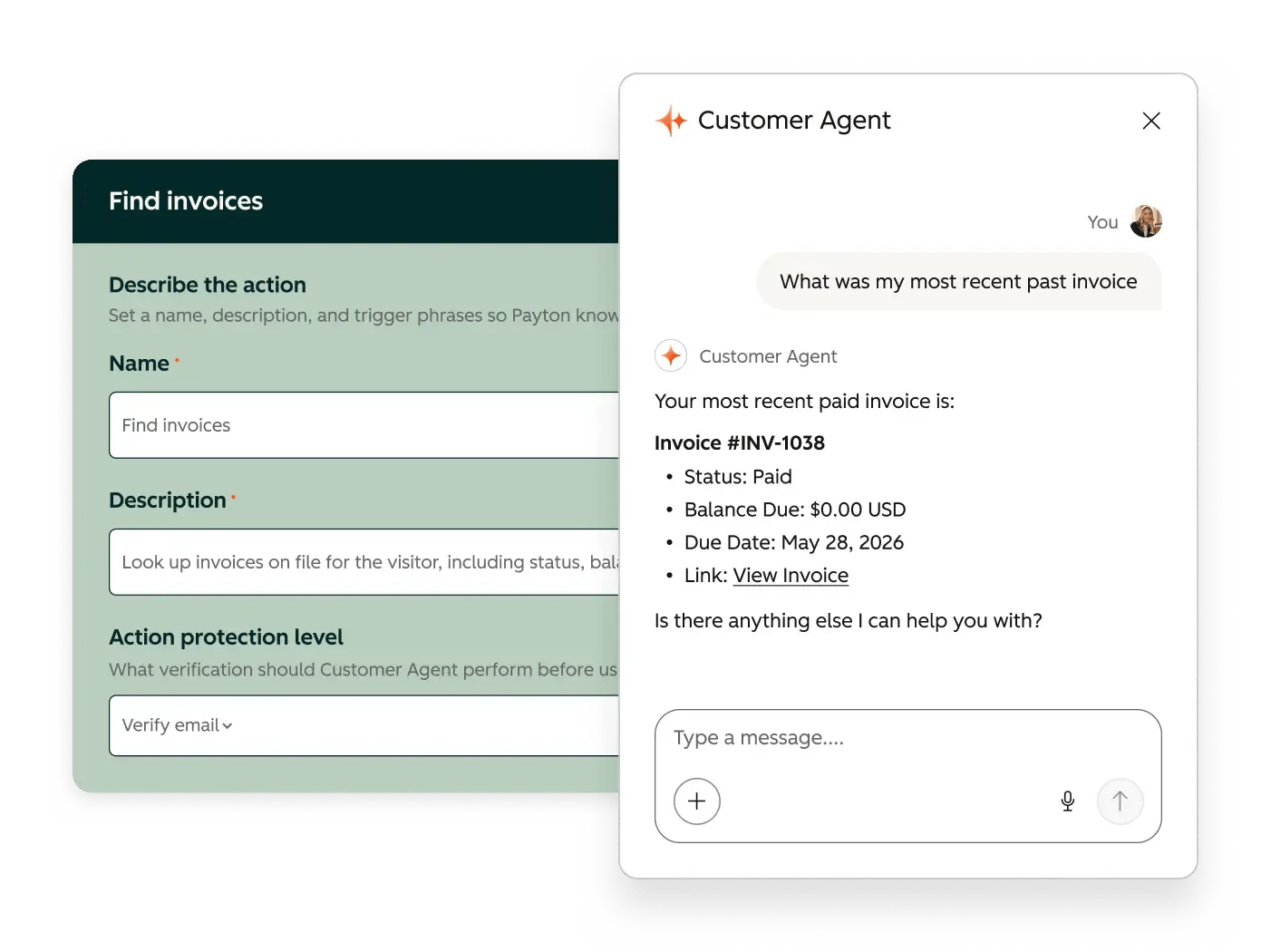
Since April 2026, it's also priced on outcomes. Customer Agent consumes HubSpot Credits only when it resolves a conversation, about $0.50 each at standard credit rates. Conversations a human takes over cost nothing.
That makes one definition very important. HubSpot counts a conversation as resolved when the agent has replied at least once with a content source or an action, and no human takes over within 72 hours of the agent's last response. Qualifying a lead can also count as a resolution.
Read that carefully. It measures whether a human got involved. It doesn't measure whether the customer's problem was solved.
A customer who gets a confident, wrong answer and gives up counts as resolved. So does a customer who solves the problem themselves after the agent points them to the wrong article. Neither of those is a failure of HubSpot's definition. It's just a billing definition, not a quality definition.
So build your own quality check. Ticket reopening management shipped in the same release: it filters out automated replies like out-of-office messages, and lets you decide whether a real customer reply reopens a ticket or opens a linked one. Use it. Then track reopen rate and satisfaction on agent-resolved conversations against human-resolved ones. Treat HubSpot's resolution rate as your billing metric and your reopen-adjusted rate as your quality metric.
One more mechanic worth knowing. If your account runs out of credits and you haven't purchased more, HubSpot pauses usage-based features until your next reset. For Customer Agent, that means a coverage gap in the middle of the month. Set credit limits deliberately, and make sure the right people get the usage alerts.
What it runs on: a definition of "resolved" you've checked against your own data.
Handoff Rules Are SLAs, Not Settings
Customer Agent's confidence decides what happens next. It answers with a verifiable source, asks a clarifying question, or hands the conversation to a human. How often it does each one depends almost entirely on your knowledge coverage.
The handoff itself is now fully configurable. You write the guidelines: when the agent hands off, immediately or later, to which users or teams, with what message, and whether ticket-based workflows handle the routing. HubSpot even ships a workflow template to reassign tickets on handoff. Its own examples of handoff triggers are the right instincts: a customer mentions a refund, a cancellation, or that they can't log in. It also recommends keeping the agent away from billing disputes and sensitive account changes.
Handoffs run in both directions now, too. Reps can assign a routine conversation to Customer Agent from Help Desk or the inbox, and fallback routing can send conversations to the agent when no human is available.
All of that is process design. In the RevOps Hierarchy, handoffs live in Tier 2, and every handoff needs a service level agreement: who picks it up, how fast, and what happens when that promise is missed. We use a relay race to explain it. The baton is the customer. A dropped handoff is a dropped customer, and an AI agent handing off to a queue nobody watches is the fastest way to drop one.
The metric that matters is time to first human response after handoff. Before you deploy, decide:
- Which request types always go straight to a person
- Which accounts should never be handled by the agent at all
- Who owns a handoff at each hour of the day, including nights and weekends
- The response-time promise after handoff, and who gets alerted when it's missed
- What the customer is told while they wait
What it runs on: an escalation process your humans already follow.
Your Resolved Tickets Are a Knowledge Base, Including the Wrong Answers
One of the most useful UNBOUND updates is the knowledge generator. It turns resolved tickets into draft Q&A knowledge that you review and approve. In HubSpot's words, the agent learns from how your team already answered.
That's the promise and the risk in one sentence. Your team's past answers include the great ones. They also include the shortcut, the outdated policy, and the workaround one rep invented two years ago that nobody else knows about. The review step isn't a formality. It's the whole value of the feature.
The new Knowledge Base Agent, in public beta, goes further. It reads closed tickets to find gaps, drafts new articles, and flags existing ones that are unclear or out of date. Each generated article consumes credits.
Clean before you generate. Kim Cormier described finding outdated content in her own database only after the agents started using it. Archive what's stale first, so the agent doesn't learn from it.
What it runs on: current, owned, reviewed content.
Segment, Test, Coach
Three more updates change how you should roll the agent out.
Audience segments give the agent extra knowledge sources for specific audiences, by language, subscription tier, or region. Enterprise customers and trial users can get different answers from the same agent. That only works if the properties behind the segments are right. If your subscription tier field is wrong, your largest customers get the trial-user answer. That's a Tier 1 problem wearing a service costume.
Testing is free, so use it hard. Previewing and testing the agent doesn't consume credits. Batch testing lets you write test questions, or generate them from real past conversations, run them in bulk, and grade the answers before anything goes live. An embedded tester stays with you on every setup page. Email targeting lets you choose which contacts the agent replies to, so you can start with one audience. Deployment recommendations use your volume, response times, and SLA adherence to suggest where to start.
After launch, coach it like a new hire. In Help Desk, you can see the sources the agent used, the actions it took, and the knowledge gaps behind each reply, then coach it without leaving the ticket. Performance reports rank where it struggles so your weekly review has an agenda.
What it runs on: accurate segment properties and a testing habit.
Customer Success Got the Retention Signals It's Been Missing
The quieter UNBOUND updates may matter most for CS leaders. Customer Success Revenue Reporting adds ready-made reports for gross and net revenue retention, renewal pipeline, and book of business. Product Usage Tracking lets you define which events count as activation and ongoing use for each product, then track adoption across accounts. Combined with the churn risk signal, that puts usage, sentiment, and renewal value on the same record for the first time.
That combination is an early warning system. It's also only as good as the data flowing into it. Product usage tracking needs usage events sent to HubSpot. If your product data lives in a warehouse nobody has connected, the retention dashboard will show healthy accounts right up until they cancel.
Help Desk picked up practical upgrades too: an omnichannel waitlist that holds tickets in priority order when every rep is at capacity, and SMS support through Twilio, both in public beta.
What it runs on: product usage events that actually flow into HubSpot.
Delight Includes Getting Paid
Service and finance now meet in the same conversation. Customer Agent can find a buyer's invoice, explain the charges, and share a secure link to pay. It can also send a payment link the moment a buyer is ready.
Revenue Agent, in beta, handles the other side: collections. It monitors open invoices wherever they were created, including external invoices synced into HubSpot, and builds a personalized outreach plan for each account. Plans regenerate when a payment comes in, a due date changes, or the buyer replies. It needs a connected inbox, and it skips invoices already set up for automatic payment.
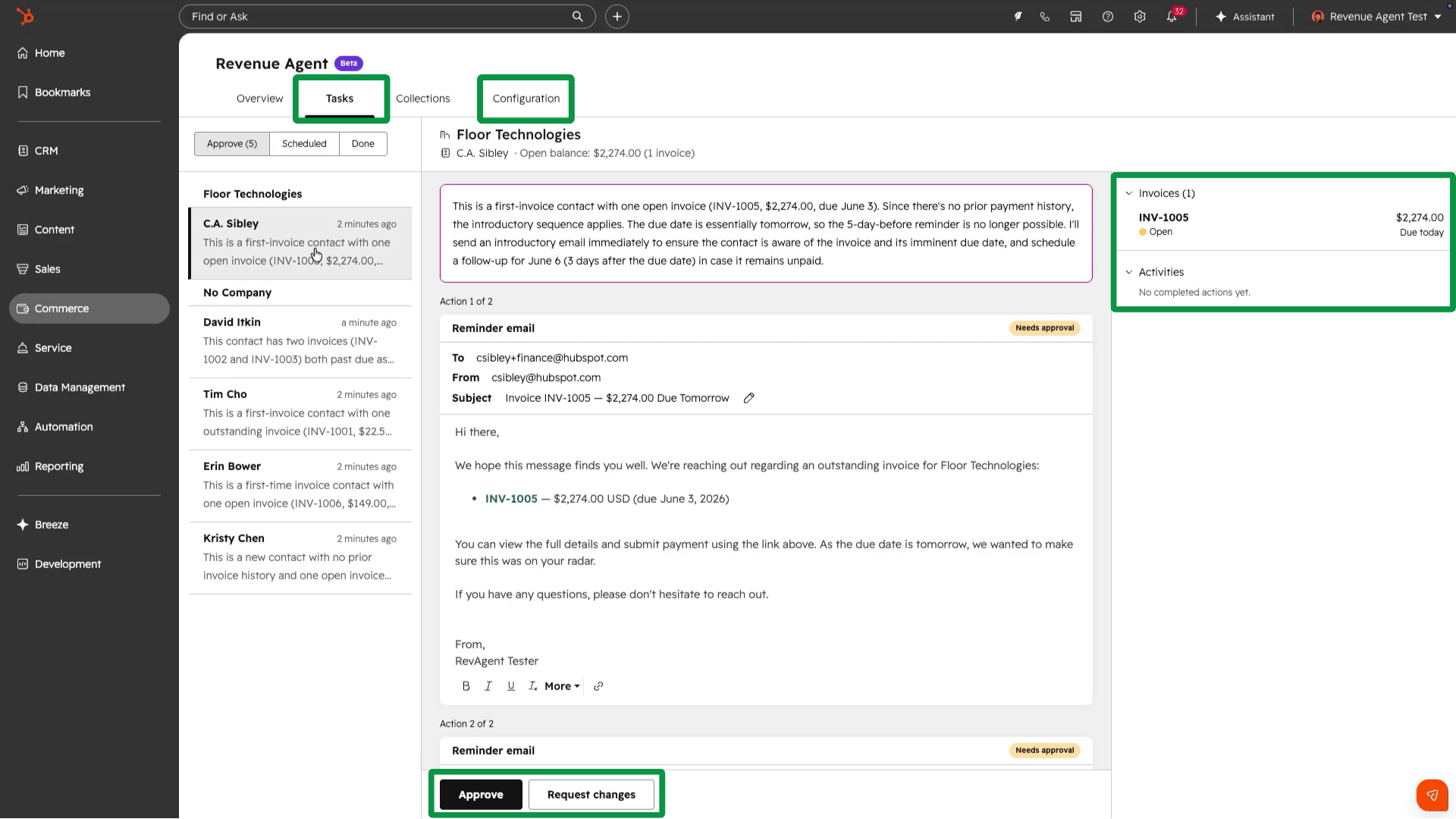
You choose how much control to keep. In one mode, every plan needs approval before any email sends. In the other, the agent sends on its own, but any billing email from the buyer gets routed to a person for review. Replies to buyer questions always need review before they go out.
Three details deserve attention before you turn it on.
First, the economics. Revenue Agent consumes 500 credits per invoice once outreach begins, about $5 at standard rates. That's trivial on a $20,000 invoice and meaningful on a $150 one. Use exclusion segments to keep small invoices out of plans.
Second, the escalation timing. The agent escalates to an internal contact right away when a buyer disputes an invoice or says they won't pay. Its time-based escalation waits until an invoice is at least 90 days past due, with at least two outreach attempts made. If your accounts receivable policy escalates at 30 or 60 days, that part of the process still needs a human owner.
Third, collections tone is now a customer experience decision. Instructions let you set tone, length, cadence, and phrases to avoid, but they can't change amounts or payment terms. And think about who shouldn't hear from the agent at all. A customer with an open support ticket about a billing error shouldn't get an automated reminder about the same invoice. Build those exclusions before the agent finds them for you.
Onboarding belongs in this conversation too. HubSpot Work, in public beta, lets teams run onboarding projects next to the customer context instead of rebuilding it in a separate tool. The handoff from sales to onboarding is the first moment a new customer decides whether you meant what you promised.
What it runs on: synced invoices, a written AR policy, and exclusions for accounts that need a human.
A 30-Day Service Plan
Week 1: Define "resolved" for yourself. Baseline your reopen rate and satisfaction scores. Configure ticket reopening rules so autoresponders stop polluting the numbers.
Week 2: Write the handoffs. Document handoff triggers, owners by hour, and the response-time promise after handoff. Archive stale knowledge base content.
Week 3: Generate and test. Run the knowledge generator on last quarter's resolved tickets and review every draft. Batch test the agent against real past conversations.
Week 4: Launch small. Deploy to one channel for one audience. Set credit limits and usage alerts. Review coaching insights every week.
HubSpot's Duncan Lennox said something on stage that sums up this whole release: in a world drowning in automation and noise, the people in marketing, sales, and service are what make a business human. In service, that isn't a slogan. It's the job description.
So here's the question to ask before you deploy anything. If Customer Agent resolves 70% of your conversations next quarter, how will you know whether your customers agree?