Discover how HubSpot's Growth Context transforms CRM usage and the importance of accurate data for AI-driven success in sales and marketing.
Two emails went up on the UNBOUND main stage in Boston. Same rep. Same lead. Same deal.
The first came from a generic AI tool. HubSpot's Chief Product and Technology Officer, Duncan Lennox, didn't bother reading it aloud. Nobody would answer it, and the rep who sent it would stop trusting whatever wrote it.
The second came from HubSpot running on what it now calls Growth Context. It named the product the prospect had trialed, how it compared to the competitor, the buyer's specific pricing concern, and the right person to loop in next. Lennox's verdict: every sentence earned its place.
Here's what the demo didn't explicitly say. That second email is only as good as the context behind it. Point the same system at a retired product, a persona you stopped selling to, or an ICP from two years ago, and it writes the same confident, specific, personal email. About the wrong thing.
HubSpot CEO, Yamini Rangan, said it plainly in her keynote: AI with bad context is worse than no AI. Her examples will feel familiar to anyone who has inherited a portal. An agent recommending a product that's no longer in the catalog. A pipeline analysis built on the wrong definition of ARR. An approval routed to a manager who changed roles last week.
UNBOUND 2026 gave HubSpot customers real tools to fix this: a CRM that updates itself, a Context Home that scores your foundation, and one assistant that puts it all to work. They're good tools. But they measure how complete your context is, not whether it's true. And they split ownership of that context in a way most teams haven't noticed yet.
This is the first of four deep dives on UNBOUND 2026. Our UNBOUND recap covers every announcement. This one covers the foundation everything else runs on.
HubSpot Didn't Add AI to the CRM. It Rebuilt the CRM Around Context.
HubSpot surveyed 6,000 customers and prospects. Ninety percent use AI. Six percent report transformational results. That 6% is four times more likely to hit revenue targets.
The difference isn't the model. It's context, which Rangan broke into three layers. Business context is what makes you you: brand, voice, product, positioning. Customer context is every conversation across every channel, plus your ICP and buying signals. Team context is how you work: roles, goals, process, approvals, methodology.
HubSpot calls the combination Growth Context, and its headline numbers are big: 3.6x more MQLs, 3.2x more deals won, and more than twice as many tickets closed. Read the footnote before you repeat them. The comparison is Professional and Enterprise customers using AI with high-quality context against Professional and Enterprise customers not using AI at all.
Then read the definition. On its Context Home product page, HubSpot defines high-quality context as actively populated CRM fields, logged activity, connected integrations, and configured team settings.
Every item on that list measures presence. None of them measures truth.
Context Home, Tab by Tab: Where the Structure Is and Where It Isn't
Context Home lives in Agent Hub, under the Context tab, and it's included in every HubSpot edition. Walk it tab by tab and a pattern shows up fast.
The Business tab is rich. Brand kit, identity and classification, location and scale, business profile, market and ecosystem, technology stack, and a full list of products and services. The Customers tab holds structured ICPs and personas.
Then there's Team & Processes. It holds user profiles and email personalities. That's the structured part.
Your sales methodology, approval rules, handoff process, and the definition of a qualified lead go somewhere else. HubSpot encourages you to add methodologies and guidelines so teams and agents work from the same playbook. In practice, that means the Custom tab: free-form text or uploaded files.
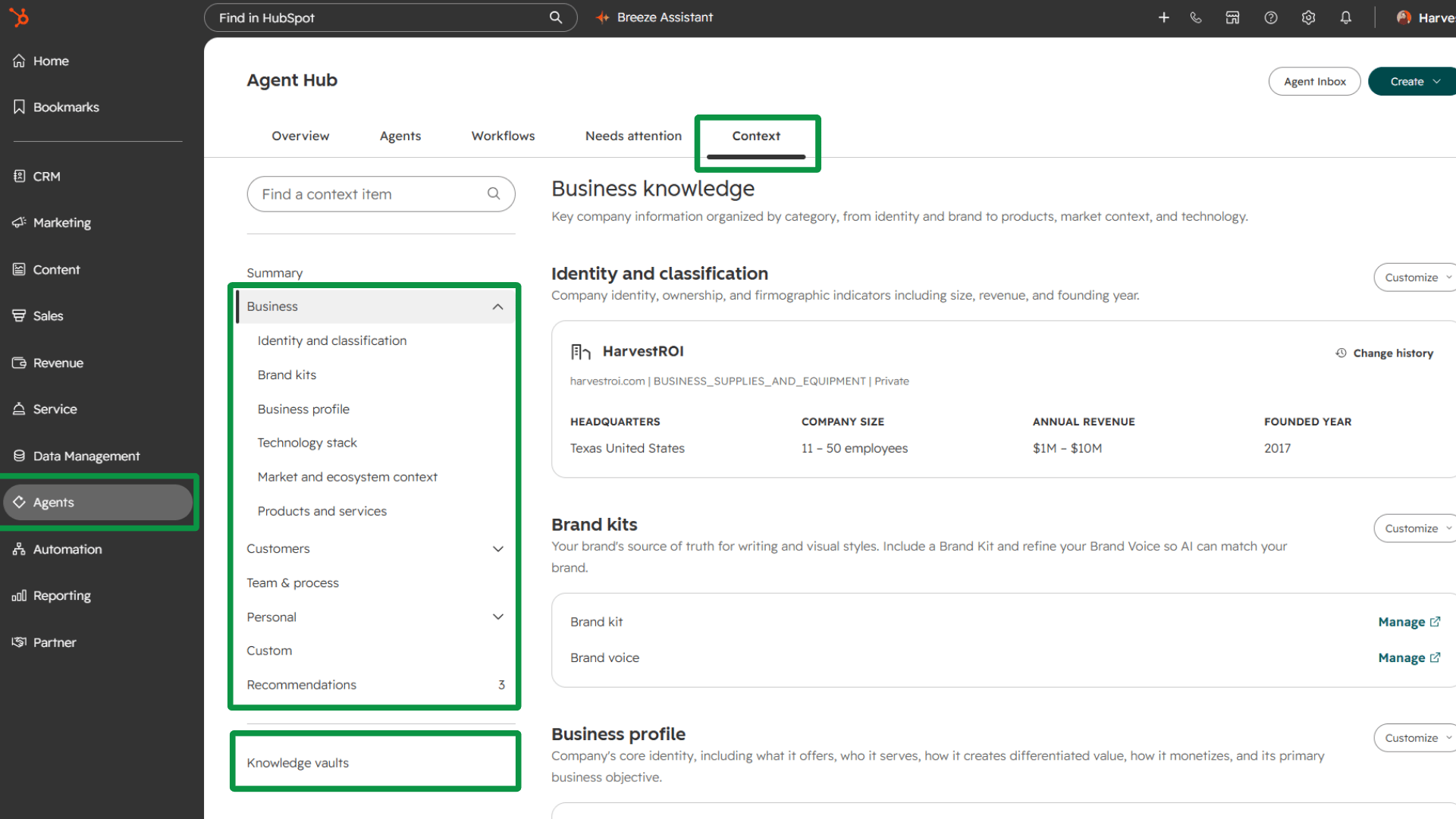
So the layer Rangan listed third, the one that defines how your business actually runs, is the one you have to write from scratch. No fields to fill. No score to chase. Just a blank box.
That isn't a flaw in the product. It's an honest reflection of how most companies operate. The process has never been written down. It lives in the VP of Sales' head, a two-year-old slide deck, and the memory of whoever has been there longest.
Our rule here has always been human-readable before machine-readable. If you can't draw the process on a whiteboard and get both VPs to agree, you can't write it into Context Home either. The agent will just inherit the argument.
Where it breaks: a fully built Business tab sitting on top of an empty picture of how your team works. Agents that know what you sell and nothing about how you sell it.
A Context Score Measures Completeness, Not Accuracy
Context Home scores how complete your context is and shows you where the gaps are. That's useful. It's also where teams will get lulled.
To a score, a filled field and a correct field look identical.
Picture this. HubSpot builds a company profile that places the business in Ohio. The business moved to Texas a year ago. The field is populated, so the score goes up. Every agent now writes, routes, and personalizes as an Ohio company.
Now multiply that across a product list with two discontinued offerings, a persona built for a buyer you stopped targeting, and an ICP nobody has checked against last year's closed-won deals. You can post a high score on a foundation that's quietly wrong.
There's a second wrinkle. HubSpot syncs context automatically from connected sources as your data changes, and it says anything you edit directly always takes precedence. That's the right call for control. It also means a manual correction outranks the source. HubSpot doesn't spell out what happens when the source changes after you've overridden it, so treat every manual edit as a field with an owner and a review date. Otherwise today's fix becomes next year's Ohio.
HubSpot does help. It surfaces recommendations when context looks outdated, drawn from new meeting notes and transcripts, and you decide what changes. Use them. Just don't mistake them for an audit.
Before you trust the score, ask each layer the questions a score can't answer:
- Is every product in the list still sold, at the price listed?
- Does every persona match someone who actually bought in the last 12 months?
- Does the ICP match your best closed-won customers, or the ones you wish you had?
- Was your brand voice generated from content you'd still publish today?
- Is your methodology written down anywhere an agent can read it?
Where it breaks: a high score built on stale positioning, a retired product list, and a buyer who no longer exists.
The Person Who Can Edit Context Usually Doesn't Own It
This one is easy to miss. HubSpot requires Super Admin or Partner Admin permission to update most portal-level context. Users with Prospecting Agent Admin permission can also edit Products & Services. Every user can manage their own profile and email personality.
Now map that against who owns the truth. Marketing owns brand and positioning. Sales leadership owns the ICP and the methodology. Customer success owns what customers actually say. Product or finance owns the product and price list.
The people who own the truth mostly can't edit it. The person who can edit it mostly doesn't own it.
That gap produces two failure modes. The admin updates positioning nobody approved. Or nobody updates anything, because the admin is waiting on an answer that never comes.
The fix is governance, not permissions. In the RevOps Hierarchy of Needs™, Tier 1 isn't only data architecture. It's data governance: who owns the truth. "Everyone owns the data" means no one does. Assign a steward to each layer of context, give the admin a clear change process, and put a quarterly review on the calendar.
There's one more architecture decision hiding here. HubSpot uses two kinds of information: context, which applies across every AI tool in the portal, and knowledge vaults, which you attach to specific projects or agents. Where you put something decides where it shows up. Support escalation guidance belongs in a vault attached to your service agent, not in global context where it can bleed into a marketing email. A detailed competitive teardown probably belongs in a sales vault, not in the context every tool reads.
Where it breaks: an admin publishing positioning nobody approved, or global context stuffed with material only one team should see.
The Self-Updating CRM Fixes Capture. It Doesn't Fix Definitions.
Lennox named the oldest CRM problem on stage: a CRM only knows what someone remembers to tell it. HubSpot's answer is a Smart CRM that captures every call, email, and meeting automatically. Contacts get added. Deal stages get updated. Next steps get laid out.
For teams whose reps still log calls by hand, this is the most valuable switch in the release.
But capture is only half the problem. The self-updating CRM writes onto your data model: your associations, your stages, your properties. If those were never defined, it writes the wrong thing faster.
It also only updates what someone says out loud. Buyers rarely announce your closed-lost reason, your disqualification category, or whether a deal cleared internal approval. Those fields still need to be required, defined, and owned.
Mark Moffat, CEO of IFS, said it best on the UNBOUND customer panel: a powerful platform nobody uses just compounds bad data. Automatic capture solves the "nobody uses it" half. The "bad data" half is still yours.
Where it breaks: automatic capture writing confidently onto associations and stages nobody ever agreed on.
One Assistant, Every Agent: Governance Is Now One Job
The rebuilt Breeze Assistant is the front door to all of this. You describe what you need, by typing or talking, and it pulls in the right agents, builds reports and artifacts, and takes action. Behind it, Agent Hub gives you one view of every agent in the portal, and Agent Builder lets anyone create a new one by describing it.
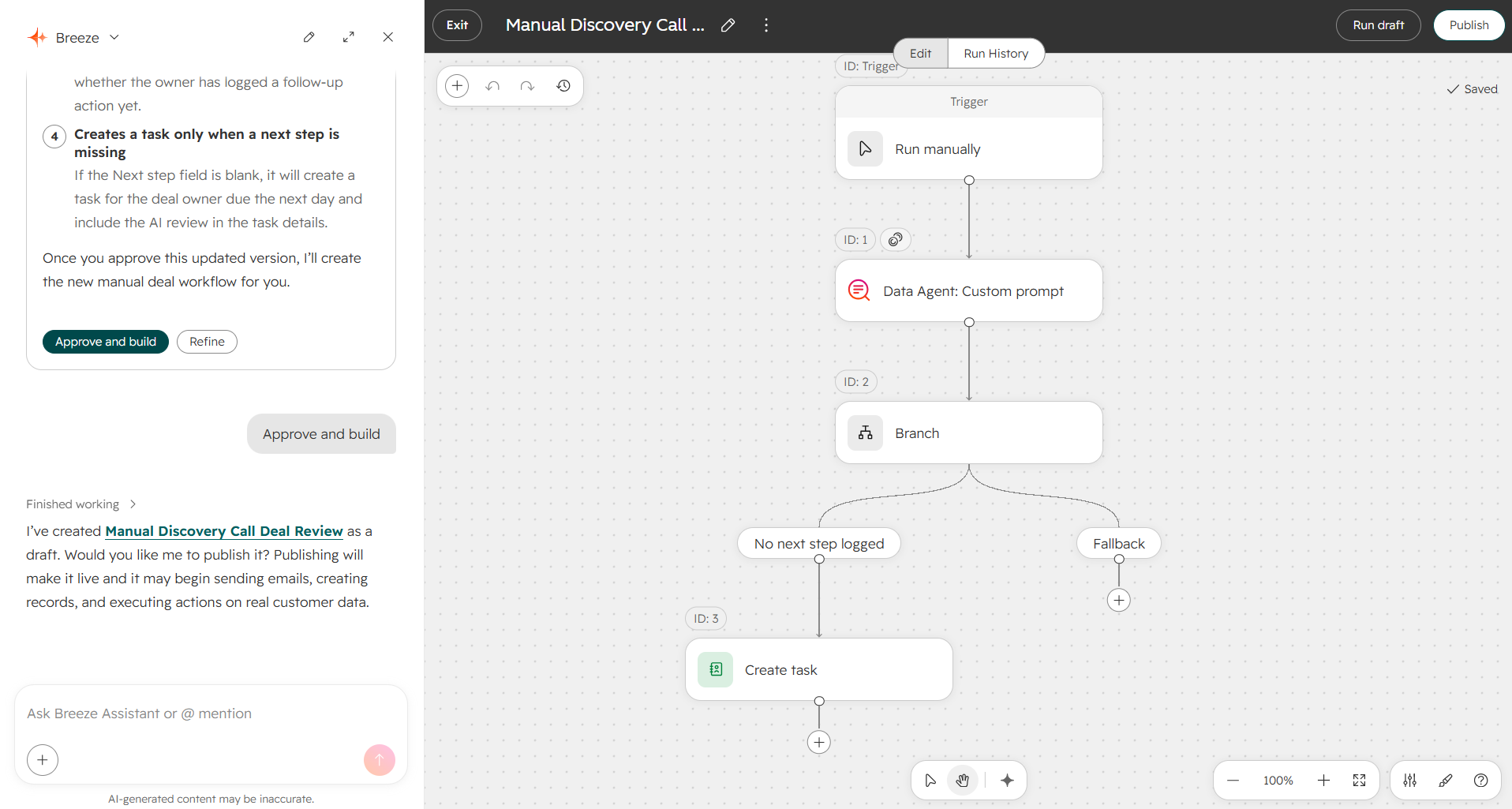
Two details matter for the foundation.
First, Breeze Assistant shows you which context it used for each response. That makes context errors traceable. When an output is wrong, you can see whether the model misread good context or faithfully used bad context. Most of the time, it'll be the second.
Second, credits. Many agents run on HubSpot Credits, and the mechanics deserve a budget owner. Credits reset monthly and don't roll over. If you use up your included credits and haven't bought more, usage-based features pause until the next reset. Once you've purchased additional credits, the default setting is an automatic upgrade: exceed your limit and your account moves to a higher credit tier for the rest of your contract, and you can only downgrade at renewal. You can switch to pay-as-you-go overages instead, and you can set limits for the whole account and for individual tools.
Read that default again. One runaway agent in one busy month can raise your credit tier for the rest of your contract.
Betas add another wrinkle. HubSpot says features in beta may start consuming credits later, and while it aims to give 30 days' notice, it doesn't guarantee it. Custom agents built in Agent Builder already consume credits. "Free because it's in beta" is a date, not a status.
Rangan had the right line for all of it: just because anybody can build anything doesn't mean everybody should. The floor on building came down. The ceiling on thinking went up.
Where it breaks: agents with no owner, no defined outcome, and a credit bill nobody forecast.
Every New Agent Restarts the Pyramid at Tier 1
In the RevOps Hierarchy of Needs™, every new growth lever restarts the pyramid at Tier 1. A new product line needs its own data model, process, enablement, and reporting. So does a new market. So does a partner program.
So does an agent.
An agent is a new worker with a new job. It needs data it can trust (Tier 1), a defined process to follow (Tier 2), people who know when to use it and when to override it (Tier 3), and a way to measure whether it's working (Tier 4). Only then does it become a real growth lever (Tier 5).
When an agent's output goes wrong, audit down: from the output, to the context it used, to the data under that context. When you fix it, build up: data first, then process, then the agent.
We covered the deployment side in Before You Deploy HubSpot's AI Agents, Fix the Foundation. UNBOUND doesn't change that advice. It makes it more urgent, because now nearly everything in HubSpot runs through an agent.
A 30-Day Foundation Plan
You don't need to boil the ocean. You need four weeks and a few owners.
Week 1: Walk Context Home before you look at the score. Open every tab. Mark each item accurate, stale, or missing. Then look at the score and notice how little it told you.
Week 2: Assign stewards. One owner for each layer: brand and positioning, ICP and personas, products and pricing, methodology and process. Decide what belongs in global context and what belongs in a vault.
Week 3: Write your team context. Methodology, stage exit criteria, approval rules, handoff process. Plain language. If a process takes more than a page to explain, it isn't defined yet.
Week 4: Put guardrails on spend and ownership. Set account-level and feature-level credit limits. Choose between auto-upgrades and pay-as-you-go. Give every active agent in Agent Hub a named owner and a defined outcome.
Rangan closed her keynote with three questions. Do you know what outcomes you want to drive? Do you have the right foundation of context and data? Do you have people who can think and build with AI?
Most teams will answer yes to the first, yes to the third, and check their Context Home score to answer the second.
The score will say yes. Make sure your context agrees.