HubSpot Agent Hub: What It Is, What It Costs to Run, and How to Deploy It
HubSpot Agent Hub explained: what it costs in credits, what your included allotment actually buys, and what to fix in your portal before you activate...
HubSpot Revenue Hub explained: verified pricing, which features are Enterprise-only, transaction fees, and what it assumes about your CRM before you buy.
HubSpot Revenue Hub is HubSpot's native quote-to-cash system. It combines AI-assisted CPQ, contracts, subscription billing, invoicing, and payment collection inside the same CRM that holds your customer records. It launched on June 16, 2026 as the expansion of Commerce Hub. Quoting and CPQ require a paid Revenue Seat. Billing and payments are available on every tier, including free.
You are being asked to make a decision about Revenue Hub right now, and most of what you can read about it was written in the first three weeks after launch by people paraphrasing the same announcement post.
That would be fine if the announcement post were the whole story. It isn't. The product is straightforward. What it assumes about the system underneath it is where the money gets made or lost.
This page covers what Revenue Hub actually is, what it costs (including the part about transaction fees that nobody writes about), which features are gated behind which tier, what it expects from your data model, and how to sequence an implementation so you are not rebuilding it in six months.
Revenue Hub is HubSpot's system for everything that happens between "the customer says yes" and "the money is in the bank."
Your CRM already holds customer context: who the buyer is, what the deal history looks like, who owns the relationship. Revenue context has historically lived elsewhere. What they bought, what they pay, when the contract renews, which invoices are open. That data typically sits in a standalone CPQ tool, a billing platform, an accounting system, and at least one spreadsheet that one person maintains.
Revenue Hub puts revenue context in the same place as customer context. Quotes are built from the deal record. A signed quote produces a contract record. Contracts drive billing. Billing produces invoices. Payments flow back to the CRM. Every team reads from the same set of records.
That is the whole idea. Everything else is implementation detail, and the implementation detail is what determines whether it works.
Both, and the distinction matters less than people think.
Commerce Hub was HubSpot's billing and payments product. Revenue Hub is Commerce Hub plus quoting, CPQ, and a contracts object, under a name that reflects the wider scope. If you were a Commerce Hub customer, nothing was taken away. Your Commerce Seat is now called a Revenue Seat. Your payment links, subscriptions, and invoices carried forward.
The name change is not cosmetic. "Commerce" described a transaction. "Revenue" describes a relationship that includes amendments, renewals, and expansions. The product now has an object model that reflects that.
Revenue Hub did not appear in June 2026. It assembled over five years.
|
Year |
What shipped |
|---|---|
|
2021 |
HubSpot Payments, native payment collection in the CRM |
|
2023 |
Billing: invoices, subscriptions, recurring revenue |
|
2025 |
AI-assisted CPQ, announced at INBOUND |
|
2026 |
Contracts object and connected quote-to-cash, launched June 16 |
We covered the Commerce Hub stage of this build when it was still called Commerce Hub, in HubSpot's quote-to-cash platform. The architecture argument has not changed. The object model has.
The contracts object is the structural change. Everything else is a feature.
Before, a signed quote produced a deal marked Closed Won and, if you had built it, a subscription. The commercial terms of the agreement lived in a PDF. Now a signed quote produces a structured contract record that carries term dates and value, associates to the deal and the company, and holds a history of amendments.
That is the difference between storing a document and modeling an agreement. It is also the difference between a renewal report you can build and a renewal report you cannot.
The root problem is one sentence long: revenue data and customer data live in different systems, so nobody can see the whole customer.
Here is what that looks like by team.
Sales builds quotes in a second tool, waits on approvals that live in someone's inbox, and re-keys line items that already exist in the CRM. Quote turnaround becomes a competitive disadvantage.
RevOps reconciles the CRM against the billing system every month, because what was sold and what was billed drift apart. Every report requires an export and a manual join. Integration maintenance eats the hours that were supposed to go to strategy.
Customer Success walks into a renewal conversation without knowing what the customer currently pays, what is in the contract, or whether an invoice is 60 days overdue. Expansion signals sit in a system they cannot open.
Finance chases invoices by hand and closes the month from a picture assembled out of three sources that disagree.
None of those are people problems. They are architecture problems wearing people-problem costumes.
Revenue Hub has three parts. You do not have to adopt all three, and HubSpot is explicit that billing and payments can be used independently of the paid quoting tools.
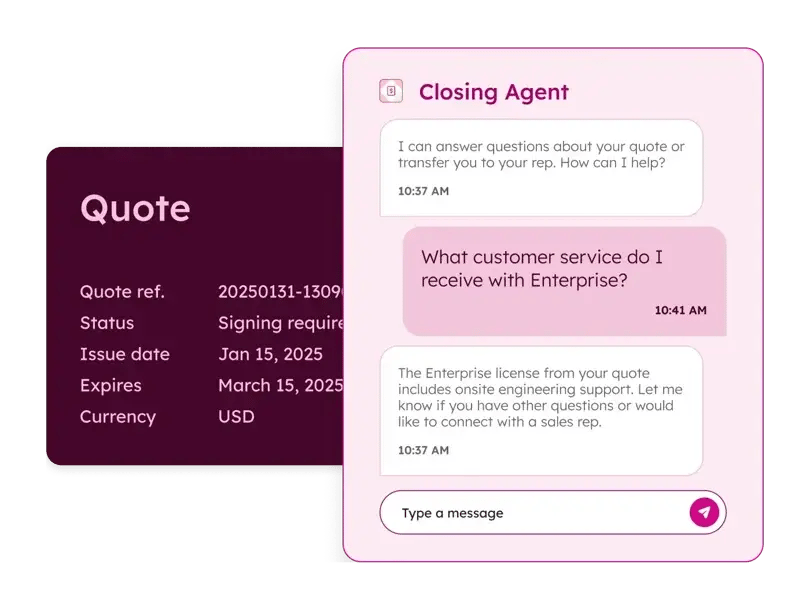
Reps build quotes from the deal record. Breeze, HubSpot's AI layer, drafts a quote from a plain-language description using deal context, the product library, and your approved templates. The rep edits rather than assembles.
On the buyer's side the quote is interactive. They review, sign, and pay in one place.
What is included depends on tier, and this is where evaluations go wrong. Quotes, quote templates, AI-generated quotes, the single-page editor, quote activity tracking, tiered pricing, and price books are available on paid tiers. Standard approvals support up to 10 approvers. E-signature is metered at 25 signatures per user per month on Professional and 50 on Enterprise, with a paid limit increase if you need more.
Two capabilities are Enterprise only. Advanced quote approvals, which allow up to five approval steps. And Quote Rules, the rules engine that enforces product compatibility and incompatibility, pricing thresholds, and quantity thresholds.
Read that last paragraph again if you are budgeting. If your discount guardrails and product bundling logic are the reason you are buying CPQ, you are buying Enterprise.
Contract and invoice data live in the CRM. What is sold is what is billed, including through mid-term amendments.
Billing covers contract records tied to deals and contacts, orders, subscriptions, subscription retries, automated invoicing, automated invoice reminders, and credit memos (currently in beta). Revenue reporting comes in three flavors: simple revenue reporting, the revenue analytics suite, and custom revenue reporting.
Accounting sync runs through a native QuickBooks Online integration and a Xero integration that is still in beta. Anyone planning a Xero-dependent implementation should confirm current status before committing to a date.
Breeze Invoice Prioritization surfaces overdue invoices by revenue impact and drafts collection follow-ups. A dedicated revenue agent that runs collections end to end is described by HubSpot as coming to beta rather than generally available. Plan for the manual path and treat the agent as an upside.
Payment processing is embedded in quotes, invoices, and payment links, so the buyer never leaves the flow they are already in.
Supported methods include cards, ACH, SEPA Direct Debit, BACS, PADs, Apple Pay, Google Pay, Klarna, and Affirm. Features include payment links, a billing portal, B2B checkout, default checkout fees, and stored payment methods.
You have two processors, and the choice has real cost consequences. See the pricing section.
Verified against HubSpot's published pricing page on August 11, 2026. Software pricing changes. Confirm current figures at hubspot.com/pricing/revenue before you build a business case on these numbers.
|
Tier |
Price |
Notes |
|---|---|---|
|
Free |
$0/month |
Up to 2 users, no credit card |
|
Professional |
$95/month per seat |
Includes 3,000 HubSpot Credits |
|
Enterprise |
$140/month per seat |
Includes 5,000 HubSpot Credits |
Per seat, per month. Several partner write-ups published in June and July state "per seat per year." That is wrong, and if you build a budget on it you will be off by a factor of twelve.
A promotional rate is currently available for new customers buying Sales Hub and Revenue Hub together: Professional at $57 per seat per month and Enterprise at $98 per seat per month, billed annually.
Paid access runs through a Revenue Seat, formerly called a Commerce Seat, which also carries Core Seat access. View-only seats cost nothing.
Revenue Hub has a free tier. Free includes invoices, payment links, and subscriptions for up to two users, with a product library capped at 100 products. Paid tiers raise that ceiling to 15 million. If your immediate problem is "we need to collect payments in HubSpot," you may not need to buy anything yet. If your problem is quoting, you do.
This is the part of the Revenue Hub cost conversation that goes unwritten, and it is the part that scales with your revenue rather than your headcount.
|
HubSpot payments |
Stripe |
|
|---|---|---|
|
Platform fee |
Free for one year, then 0.5% per transaction, ACH capped at $10 |
0.75% per transaction, ACH not capped |
|
Card processing |
2.9%, no additional per-transaction fee |
2.9% plus $0.30 per transaction, plus $15 per dispute |
|
ACH |
0.8%, capped at $10 |
0.8%, capped at $5 |
|
Buy now, pay later |
5.99% |
5.99% plus $0.30 |
|
Fraud screening |
Included |
$0.05 per transaction |
|
Card auto-updates |
Included |
$0.25 per card |
|
Bank account linking |
Included |
$1.50 per link |
HubSpot payments is available in the United States, Canada, and the United Kingdom on Starter, Professional, and Enterprise. Stripe is available on every tier including free, and is the path for businesses outside those three countries or teams that need Stripe Billing.
Two things follow from this table. First, the platform fee promotion has a clock on it. A team that enrolls today pays no platform fee for a year and then 0.5%. Model year two, not year one. Second, if you process ACH at volume, the fee caps differ and the difference compounds.
Breeze agents and AI features consume HubSpot Credits. Professional includes 3,000 per month and Enterprise includes 5,000. Additional credits run $0.010 each. Credits reset monthly and do not roll over.
If your plan involves an AI agent doing meaningful volume, credits are a line item, not a rounding error.
Revenue Hub fits companies with recurring or contract-based revenue where the CRM is already HubSpot. Software and SaaS teams managing subscriptions or seat-based pricing. Professional services firms billing retainers and project milestones. Any Sales Hub team where quoting, collecting, and renewing currently involves leaving the CRM.
Strong signals that it fits:
Revenue Hub is not built for ecommerce with shopping carts, physical product inventory, usage-based or metered billing, or in-person point of sale. If your billing model is consumption-metered, this is not your product and no amount of configuration will make it one.
Here is the section the other guides skip, and it is the one that determines whether your implementation holds.
Revenue Hub does not sit beside your CRM. It extends the object model. That means it inherits every decision you have already made, including the bad ones.
CPQ reads from your product library. If your products are inconsistent, duplicated, or named the way one rep decided to name them in 2023, every quote inherits that.
Price books let you maintain different pricing across regions, segments, and tiers. They are also a governance surface. Somebody has to own which price book is authoritative and who can create a new one. If the answer is "everyone," the answer is nobody, and you will have five price books by Q2.
Line items are where quotes, contracts, invoices, and reporting all meet. Line item structure decisions made during quoting propagate all the way to revenue reporting. Get the structure wrong and you will discover it at the point where you try to report on revenue by product, which is the worst possible moment.
The contracts object is new, and new objects change reporting.
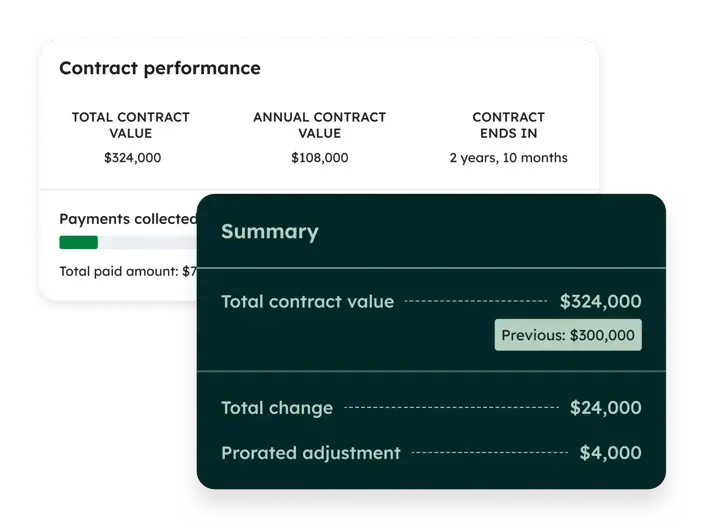
A contract associates to deals and companies and carries the commercial terms of the agreement. Amendments, renewals, and expansions resolve back to it. That is the point: one record that holds the truth about what the customer has agreed to, rather than a deal record that was accurate on the day it closed.
The consequence is that some of your reporting logic should move. Renewal forecasting built on deal properties and close dates was a workaround for not having a contract object. Now you have one. If you leave the workaround in place and add contracts alongside it, you have two sources of truth about renewals and a reconciliation meeting every month.
Before you implement, confirm the exact field and association structure in your own portal against current HubSpot documentation. Object schemas at launch are not always object schemas six months later.
Most reporting problems are data architecture problems in disguise, and Revenue Hub raises the stakes on that.
Revenue reporting now draws on quotes, contracts, invoices, subscriptions, and payments. Every one of those objects is populated by a process. If the process is inconsistent, the report is confidently wrong, which is worse than obviously wrong. We have written about this at length in why your data model is the root of CRM problems, and Revenue Hub is the clearest illustration of it we have seen in the HubSpot ecosystem.
Every guide to Revenue Hub ends its readiness section with "clean up your product catalog" and moves on. That is not a readiness assessment. That is a shrug.
Revenue Hub makes six assumptions about the system it is being installed into. If any of them are false in your portal, the product will still install and will still produce output. The output will just be wrong, faster.
It assumes your product library reflects how you sell. Not how you sold in 2022. Not how one region sells. CPQ is a compiler, and your product library is the source code.
It assumes your deal records are complete. AI-generated quotes read deal context. Sparse deal records produce quotes that a rep has to rebuild by hand, at which point you have bought a slower spreadsheet.
It assumes somebody has decided what the approval rules are. Who approves a discount above 15%. What happens when a quote expires. Whether regional pricing overrides segment pricing. These are business decisions. They get made either in a room with the people who own the number, or accidentally by whoever is configuring the workflow on a Thursday afternoon.
It assumes your accounting mapping is settled. Chart of accounts, product-to-account mapping, tax configuration. A bi-directional sync into a system whose mapping nobody agreed on does not create a clean ledger. It creates a reconciliation problem in two systems instead of one.
It assumes your contacts and companies are deduplicated. Contracts and invoices associate to records. Duplicate records produce split billing history, and split billing history is invisible until a CS lead walks into a renewal with half the picture.
It assumes your deal stages mean something. Contract creation triggers on a signed quote, and billing triggers on a contract. If your pipeline has a stage called "Verbal" that reps use to mean four different things, the automation downstream of it will inherit that ambiguity.
This is the RevOps Hierarchy of Needs™ argument in a specific context. Data Optimization is Tier 1 for a reason. Revenue Hub is a Tier 4 and Tier 5 capability sitting on a Tier 1 dependency. Garbage in, garbage speed out.
If you inherited your portal from a previous vendor, an agency that has since churned, or an admin who left, assume none of the six are true until you have checked. The Frankenstein portal does not announce itself. It just quietly produces numbers nobody trusts.
Ten checks. Answer each yes or no, honestly, without giving yourself credit for something you intend to do next quarter.
Eight or more yes: you are ready. Sequence the build and go.
Five to seven: you can buy, but scope the foundation work into the same project rather than promising yourself you will do it after go-live. You will not.
Four or fewer: buying Revenue Hub right now converts a data problem into an automated data problem. Fix Tier 1 first. The product will still be there in a quarter, probably with fewer beta labels on it.
Note which questions you answered no to. Questions 1, 2, 6, 7, and 8 are data architecture. Questions 4, 5, and 9 are process. Question 10 is adoption. Those are three different remediation efforts with three different owners, and treating them as one "cleanup" task is why cleanup tasks never finish.
The sequence matters more than the speed. Every step below exists because doing it later means redoing the steps above it.
Step 1. Map the current process end to end. Quote to signature to contract to invoice to payment to accounting entry. Include the manual steps and the workarounds. Name the owner of each handoff. This is the artifact that everything else gets built against, and it is the step teams skip because it produces a diagram rather than a feature.
Step 2. Fix the product library and price books. Deduplicate, standardize naming, confirm current pricing, decide who owns changes. This is not glamorous and it is not optional. Quote accuracy is bounded by product data accuracy.
Step 3. Decide the governance rules before configuring them. Discount thresholds, approval routing, quote expiry, who can override. Make these decisions with the people who own the revenue number, in a room, on the record. Then configure. Configuring first means you have quietly made policy decisions on behalf of your CFO.
Step 4. Build quote templates and approvals. Now that you know the rules, build them. If Quote Rules and multi-step approvals are load-bearing for your business, this is where the Enterprise tier requirement becomes concrete.
Step 5. Configure the contracts object and billing schedules. Define how a signed quote becomes a contract, what billing frequency applies, how staggered start dates and mid-term amendments behave. Decide here whether existing renewal reporting gets retired or kept, and do not keep both.
Step 6. Connect payments and test the full loop. Pick your processor with the fee table above in hand. Then run a live test from quote acceptance through invoice delivery to payment received to CRM status update. Test a failure too: a declined card, an expired quote, a partial payment.
Step 7. Connect accounting. QuickBooks Online or Xero, with your mapping already agreed from Step 1. Sync into a clean mapping, never into an open question.
Step 8. Enable AI last. Breeze Invoice Prioritization and any agent capability go on after the data and process layers are stable. This is not caution for its own sake. An agent acting on incomplete contract data generates confident, wrong follow-ups to your customers. We made this argument about HubSpot's agents generally in what to fix before turning on HubSpot AI agents, and quote-to-cash raises the stakes because the output goes directly to the people who pay you.
Step 9. Enable the team. Reps need to know the new quoting path, CS needs to know where contract history lives, finance needs to know what changed at month end. Training that happens once at launch does not survive contact with a busy quarter. The difference between implementation and adoption is documented in why onboarding alone isn't enough.
Most companies evaluating Revenue Hub are not starting from nothing. They are running a standalone CPQ, a billing platform, or both, held together by an integration somebody built and nobody maintains. That is a migration, not an implementation, and it has its own failure modes.
How do you migrate to Revenue Hub?
Historical data has to go somewhere. Existing contracts, active subscriptions, open invoices, and payment history do not migrate themselves. Decide early what comes over, what stays in the legacy system as an archive, and what date you draw the line on. "We'll bring everything" is not a decision, it is a deferral.
In-flight agreements need a rule. Contracts signed under the old system and renewing under the new one need a defined path. Pick one: recreate them in HubSpot before the renewal, or let the old system run them out and start new business in Revenue Hub. Either works. Running both without a rule does not.
Your integration is load bearing. Whatever currently syncs your CPQ or billing tool to HubSpot is doing work that Revenue Hub is about to do natively. Turning it off before Revenue Hub is configured breaks reporting. Leaving it on afterward creates duplicate records and competing sources of truth. Sequence the cutover deliberately.
Errors do not get to follow you. A migration is the one moment where you can decline to bring the mess. Bad product data, orphaned subscriptions, contracts nobody can locate the terms for. If it is broken in the legacy system, migrating it makes it broken in HubSpot with a new object type.
Somebody owns the reconciliation window. For a period, both systems hold partial truth. That period needs an owner, a checklist, and an end date.
Run the migration as its own workstream with its own plan. Folding it into "the Revenue Hub project" is how a four-week configuration becomes a four-month cleanup.
The comparison worth making is about fit, not about which vendor is better. Three architectures, three different profiles.
|
Native to HubSpot |
Enterprise CPQ suite |
Point solutions |
|
|---|---|---|---|
|
Best for |
Teams already running the CRM in HubSpot |
Complex configuration logic, deep existing platform investment |
A single acute need, fast |
|
Configuration depth |
Rules engine at Enterprise, tiered and flat pricing, price books |
Very deep, including multi-tier ramps and manufacturing logic |
Varies, usually narrow |
|
Implementation profile |
Weeks for most mid-market teams |
Months, with dedicated admin capacity |
Days to weeks |
|
Ongoing ownership |
Existing HubSpot admin |
Typically a dedicated specialist |
Distributed, often unowned |
|
Where revenue context lives |
In the CRM |
In the platform, if the CRM is the same platform |
Outside the CRM, integrated |
Choose native when your CRM is HubSpot and your configuration needs are real but bounded. Choose an enterprise CPQ suite when your product configuration logic is genuinely complex, you already have the platform, and you have the specialist capacity to run it. Choose point solutions when you have one urgent problem and you are willing to accept the integration burden that comes with it.
The failure mode to avoid is choosing based on capability ceiling rather than capability need. Buying for configuration complexity you do not have is how teams end up with a system nobody can administer and a rules engine nobody has touched in a year.
There is no migration to dread here if you are already a Commerce Hub customer. Your features carried forward and your seat was renamed. Nothing forces a decision today.
The argument for moving now is not urgency. It is sequencing.
Several capabilities are still in beta: credit memos, the Xero integration, the Breeze closing agent. A dedicated revenue agent is described as coming to beta. When those reach general availability, they will act on whatever contract, invoice, and payment data exists in your portal. Teams that spend the intervening months fixing product data, defining approval rules, and settling accounting mapping will be able to turn those capabilities on. Teams that wait will spend that same window doing the cleanup, just later and under more pressure.
The other clock is the payments platform fee promotion. Free for one year is a real benefit and a real expiry date.
The honest version: the technology is ready. The question is whether your foundation is. That question has a specific answer in your portal, and it is worth getting before you buy seats rather than after.
HarvestROI is a Diamond HubSpot Solutions Partner. We build the data models, process architecture, and reporting that make HubSpot products like Revenue Hub work for your business, and we run every engagement against a published order of operations rather than a project plan invented per client.
For Revenue Hub specifically, that means product library and price book remediation before quoting is configured. Approval logic and governance rules defined with the people who own the number. Contracts object design that retires the renewal workarounds instead of stacking on top of them. Accounting integration mapped before the sync is switched on. Quote-to-cash process design that names an owner for every handoff. And AI enablement is designed to the point where the data underneath it can support it.
The reason we sequence it that way is not philosophical. Across 300+ client projects the same pattern recurs: undocumented data models, workflows nobody can explain, and reports leadership does not trust. Revenue Hub does not fix any of those. It inherits them and moves faster.
Every engagement also ships with AdoptionHub™, our browser extension that embeds your processes and rules directly inside HubSpot, so the quoting and billing standards you define are visible to your team at the moment they need them rather than in a document nobody opens.
If you are evaluating Revenue Hub, or you have already bought it and want it implemented in an order that holds, we should talk about what your portal actually looks like first.
HubSpot Revenue Hub is HubSpot's native quote-to-cash system. It brings AI-assisted CPQ, contracts, subscription billing, invoicing, and payment collection into the same CRM that holds customer and deal data. It launched on June 16, 2026.
Commerce Hub was renamed and expanded into Revenue Hub in June 2026. All Commerce Hub capabilities carried forward. The expansion added AI-assisted CPQ, a contracts object, and a connected flow from quote through payment. Commerce Seats became Revenue Seats.
As of August 11, 2026, Revenue Hub Professional is $95 per seat per month. Enterprise is $140 per seat per month. A free tier is available for up to two users. Payments are transaction-based with no monthly platform fee.
Verify current pricing at hubspot.com/pricing/revenue
Yes. Revenue Hub has a free tier that includes invoices, payment links, and subscriptions for up to two users, with a product library limited to 100 products. Quoting and CPQ require a paid Revenue Seat.
No. Billing and payments are available across all tiers independently. CPQ and quoting require a Revenue Hub Professional or Enterprise seat, which is commonly purchased alongside Sales Hub, and HubSpot offers a promotional rate for buying both together.
Payment processing runs through HubSpot payments or Stripe. HubSpot payments charges no platform fee for the first year and 0.5% per transaction after that, with ACH capped at $10. Stripe carries a 0.75% platform fee plus per-transaction charges including $0.30 per card transaction and $15 per dispute. Card processing is 2.9% on both. Verify current rates with HubSpot before modeling.
Advanced quote approvals, which support up to five approval steps, and Quote Rules, the engine that enforces product compatibility, pricing thresholds, and quantity thresholds. Standard approvals supporting up to 10 approvers are available on Professional. E-signature is metered at 25 per user per month on Professional and 50 on Enterprise.
Quoting, CPQ, contracts, and billing tools are available globally. HubSpot payments processing is available in the United States, Canada, and the United Kingdom. Stripe processing is available in most countries Stripe supports. Local e-invoicing regulations are your responsibility to confirm.
Yes. HubSpot offers a native QuickBooks Online integration. The Xero integration is currently in beta. Both support syncing contacts, products, invoices, and payments. Confirm current beta status before planning a Xero-dependent implementation.
Breeze-assisted quote generation, Breeze Invoice Prioritization for surfacing and following up on overdue invoices, the Breeze closing agent in beta, and Customer Agent for handling billing questions and payments through chat, email, and WhatsApp. A dedicated revenue agent for end-to-end collections is described by HubSpot as coming to beta. AI features consume HubSpot Credits, with 3,000 included monthly on Professional and 5,000 on Enterprise.
Yes. HubSpot exposes revenue data through its API and native MCP connectors, so external AI tools can query live contract, invoice, and payment data without an export. This only produces useful answers if the underlying records are complete and current.
A product library that reflects how you actually sell, complete deal records, documented approval and discount rules, agreed accounting mapping, deduplicated contacts and companies, and deal stages with consistent exit criteria. Revenue Hub inherits your existing data model rather than replacing it, so unresolved data problems become automated data problems.
Pricing, tier gating, and beta status change. Every figure on this page was verified on August 11, 2026 and should be reconfirmed against HubSpot's pricing page before it informs a purchase decision.
HubSpot Agent Hub explained: what it costs in credits, what your included allotment actually buys, and what to fix in your portal before you activate...
The Future of E-commerce, Now Within Your Grasp. Learn more about HubSpot's new Commerce Hub, unveiled at INBOUND 2023.
Learn how to use HubSpot’s AI workflow documentation effectively, without skipping strategic planning. Discover RevOps best practices for automation...