HubSpot Revenue Hub: What It Is, What It Assumes About Your Portal, and How to Implement It
HubSpot Revenue Hub explained: verified pricing, which features are Enterprise-only, transaction fees, and what it assumes about your CRM before you...
HubSpot Agent Hub explained: what it costs in credits, what your included allotment actually buys, and what to fix in your portal before you activate an agent.
HubSpot Agent Hub is the console where you activate, monitor, and manage every AI agent running across marketing, sales, and service. Agent Builder, inside it, lets you create custom agents without code. Both launched in public beta on July 23, 2026 and are included for Professional and Enterprise customers. Running agents consumes HubSpot Credits.
Your team has probably already turned on an agent. Maybe two. Somebody enabled Customer Agent in a slow week, somebody else tested Prospecting Agent against a list, and neither of them told the other.
That is the condition Agent Hub was built for, and it is worth being honest about what that means. HubSpot did not ship a console because consoles are exciting. It shipped one because the agents got ahead of the management.
This guide covers what Agent Hub actually is, what each stock agent does, how Agent Builder works, what the whole thing costs to run once volume is real, and what has to be true in your portal before any of it produces output you can trust.
|
Launched |
July 23, 2026 |
|
Status |
Public beta, both Agent Hub and Agent Builder |
|
Availability |
Professional and Enterprise, across Marketing, Sales, Service, Data, Content Hub, and Smart CRM |
|
Included cost |
No separate license. Included at those tiers |
|
Usage cost |
HubSpot Credits, consumed per agent action |
|
Where to find it |
More → Agents → Agent Hub |
|
Previously called |
Agent Hub was Breeze Agents. Agent Builder was Breeze Studio |
Verified against HubSpot's product, pricing, and knowledge base documentation on August 11, 2026. This is a public beta and the details move. Confirm before you commit anything to a plan.
Agent Hub is the management layer for AI agents inside HubSpot. It is where agents get activated, monitored, permissioned, and retired.
The console does four things. It shows live status and recent results for every active agent. It surfaces agents you have not turned on yet and lets you activate them in one click. It gives you a route into Agent Builder and the Agent Marketplace without leaving the screen. And it organizes agent outcomes by go-to-market goal rather than by product line, using HubSpot's four categories: building demand, winning deals, delighting customers, and scaling growth.
That last point is a design decision worth noticing. HubSpot did not organize this by hub. It organized it by outcome, which is a bet that the person managing agents cares about the result rather than which product the agent technically belongs to. That is the correct bet, and it also means an agent you think of as a "sales tool" may show up somewhere you did not expect.
These three names get used interchangeably and they are not the same thing.
|
Layer |
What it is |
|---|---|
|
Agent Hub |
The console where agents are activated, monitored, and managed |
|
Agent Builder |
The no-code canvas where you create custom agents and agentic workflows |
|
Breeze Assistant |
The conversational assistant available throughout HubSpot |
Agent Hub is the management. Agent Builder is the construction.
They were renamed. Agent Hub is the new name for what HubSpot called Breeze Agents. Agent Builder is the new name for Breeze Studio.
The renaming is not cosmetic, and it lands one month after Commerce Hub became Revenue Hub. Two hub-level renames in five weeks tells you something about how quickly HubSpot's product taxonomy is being rebuilt around AI. Practically, it means documentation, training material, and internal SOPs written before July 2026 use names that no longer exist in the interface. If your team has any written process referencing Breeze Studio, it is already stale.
The problem is agent sprawl without shared context.
HubSpot's own framing of the failure case is a sales prospecting agent reaching out to an account in the same week a service agent is working an open complaint from that same account, with neither aware of the other. Duncan Lennox, HubSpot's Chief Product and Technology Officer, describes the issue as agents working from different pictures of the customer, or from no picture at all.
That is a real problem and it is not a hypothetical one. It has a second half that gets less attention: when leadership asks what the AI investment produced, nobody has an answer, because nothing was measured at the point of activation.
Agent Hub addresses both. Shared CRM context handles the first. A console with per-agent outcomes handles the second. Whether it solves them depends entirely on what is underneath, which is the rest of this guide.
Agent Hub requires a Professional or Enterprise subscription. Per HubSpot's documentation, that includes Marketing Hub, Sales Hub, Service Hub, Data Hub, Content Hub, and Smart CRM at those tiers.
There is no Starter access and no free tier. There is also no separate Agent Hub license: it is included at the qualifying tiers, and what you pay for is usage, not access.
You reach it under More → Agents → Agent Hub. If More does not appear in your portal, Agents is reachable directly in the navigation.
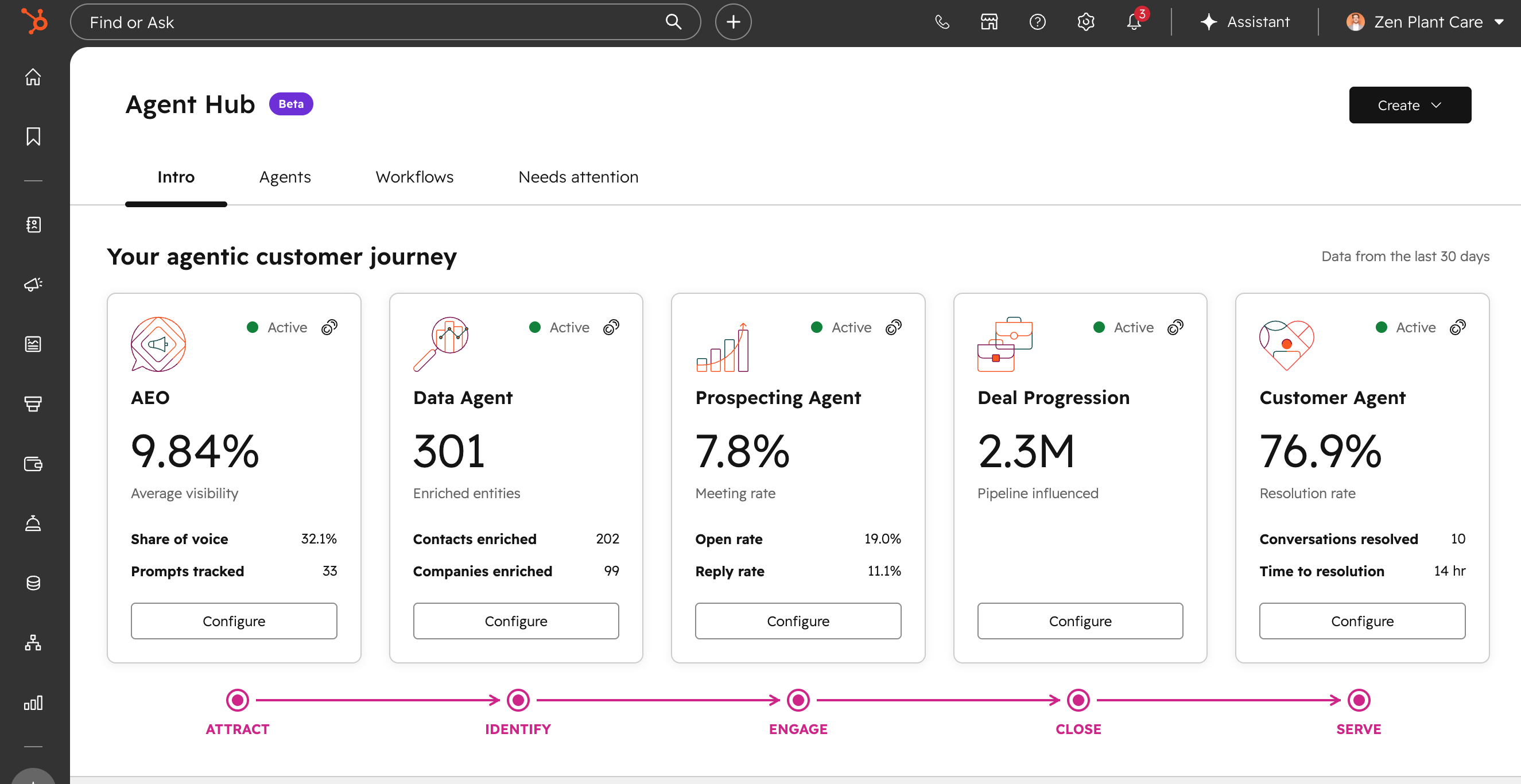
The Overview tab holds the "agentic customer journey" view. Each card represents an agentic capability. Active ones display outcomes. Inactive ones display what they would do if you turned them on, with an Activate button.
The Workflow tab is where users create, view, and manage agentic workflows. They can save, publish, turn on, turn off, duplicate, rename, or delete workflows. Set triggers for when a workflow starts and connect actions into a sequence.
The Agents tab is where individual agents are managed, cloned, and deleted. The presence of a clone function is worth pausing on. Cloning is how you get from three agents to thirty without noticing, which is a governance problem we will come back to.
The Context tab defines the business information every agent draws on: company messaging, tone, brand, and ICPs. Inside it, knowledge vaults hold narrower context for specific use cases such as product details, internal documentation, or support guidance. This tab is the most consequential screen in the product and it gets its own section below.
The Needs Attention tab is a triage area for items that need human follow-up, such as agent issues or requests requiring review.
The Agent Inbox is where agent output goes for review before it is acted on.
There is also an Agent Marketplace for installing agents built outside your portal.
The agentic customer journey view surfaces five capabilities, and the wider Agent Hub product page lists more. Here is the full set, with the job each one should be given first.
Customer Agent. Resolves inbound support conversations across channels using your knowledge base and help content. First job: your ten highest-volume repeat questions, with an explicit handoff rule for everything else. It fails when your knowledge base is thin or stale, because it can only answer from what you have written down.
Prospecting Agent. Monitors accounts for buying signals, researches them, and drafts personalized outreach. First job: research and draft only, with a human sending. Unattended sending against a loose ICP definition is how a sending domain gets into trouble.
Data Agent. Answers custom questions about contacts and companies using CRM records, calls, emails, and documents. First job: read-only questions for a couple of weeks before it gets a single write permission.
Deal Progression. Suggests next steps after calls and keeps deals moving with AI-recommended actions and CRM updates for approval.
Knowledge Base Agent. Reads real ticket volume, finds gaps in your help content, and drafts the missing articles.
Content Agent (beta). Produces content assets. First job: repurposing material a human already approved. Also the most expensive action on the credit sheet by a wide margin, which the pricing section covers.
HubSpot AEO (beta). Tracks how your brand appears in AI-generated answers across engines and recommends what to create to close the gaps.
Breeze Assistant. The conversational assistant, available wherever your team works in HubSpot.
HubSpot publishes outcome figures for several of these, including 77% more customer tickets closed per month, 39% faster ticket resolution, 65% more sales leads created per month, and a 26% higher win rate. These are HubSpot's own numbers. Treat them as directional marketing claims rather than benchmarks, and build your business case on your own baseline instead.
Agent Builder is the no-code canvas where custom agents get made. It is in beta.
You describe what you want in plain language through Breeze Assistant, and the builder assembles it. Agents and workflows live on the same canvas, so a custom agent and the structured automation around it are built in one place rather than two. Triggers can come from a schedule, a contact update, a webhook, or a third-party integration.
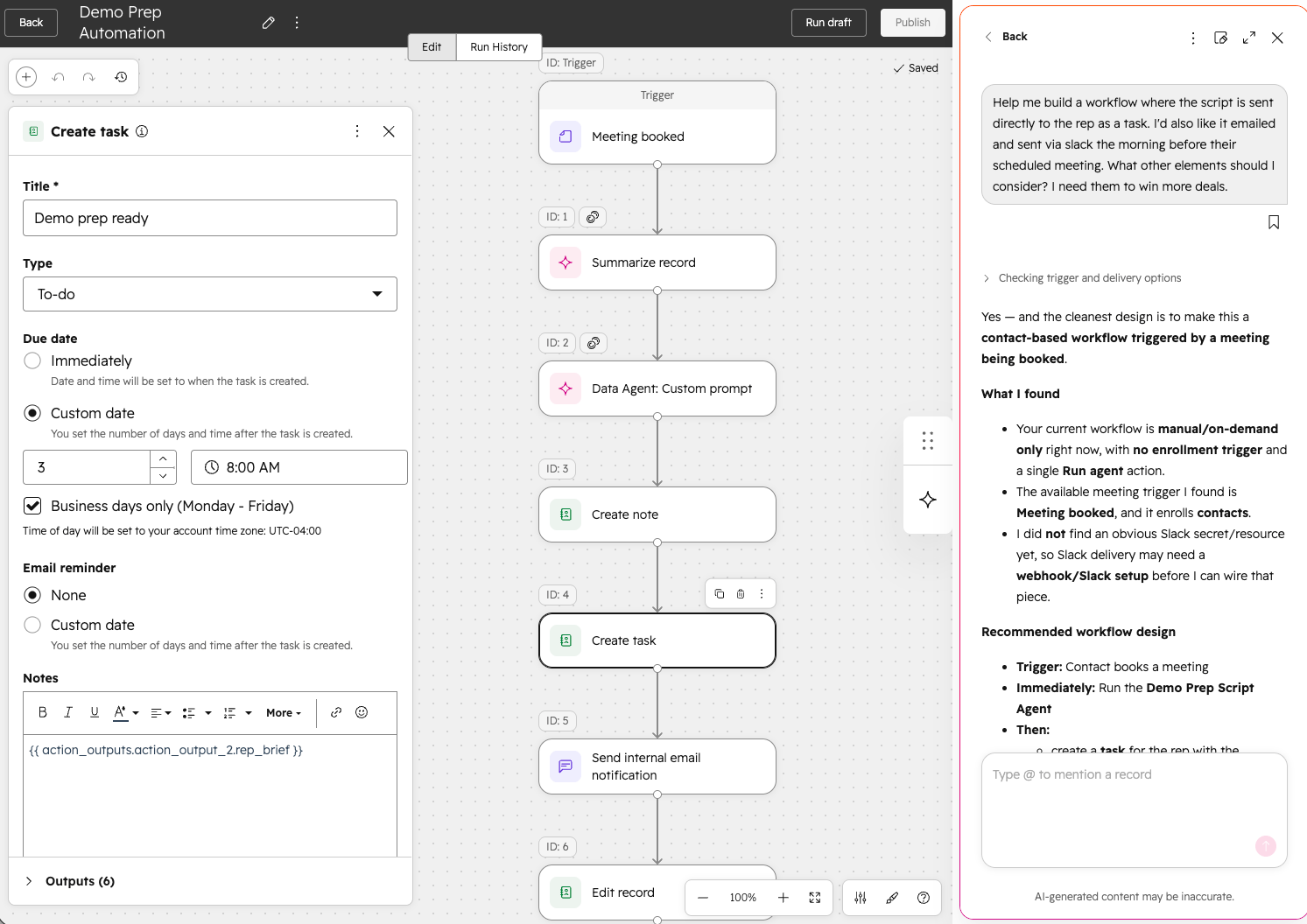
Six things get configured on every agent:
HubSpot's recommended pattern is to approve each action while you build trust, then release the agent to run unattended once you are ready. That is the right pattern and almost nobody follows it, because approving actions is tedious and turning off the approval gate makes the tedium stop.
Treat instructions as process documentation, not prompt writing. If the instruction cannot be handed to a new hire as a description of the job, it is not specific enough for an agent either.
This is the question that decides whether Agent Hub saves you money or costs you money, and it has a clean answer.
Workflows follow rules. Agents interpret context.
If you can write the logic in advance, use a workflow. When a deal moves to Closed Won, create an onboarding task. The trigger is known, the action is known, no judgment is required, and it will run identically every time.
If the work requires reading something and forming a view, use an agent. Review the last discovery call, identify the main concern, and recommend a next step. There is no rule that produces that output, because the input is different every time.
The cost consequence is direct. Workflows and automation in Agent Builder are included at Professional and Enterprise and consume no credits. Custom agents run on credits, charged every time the agent completes a configured action. Which means every piece of work you assign to an agent that a workflow could have handled is a recurring bill you did not need to create.
In practice the two work together. The agent interprets, the workflow executes the structured steps that follow.
HubSpot publishes agent pricing in two different vocabularies on two different pages, and they describe the same mechanism. This trips people up, so here is the reconciliation.
On the Agent Hub page, pricing is expressed as pay-per-outcome. In the credits rate sheet, the same actions are expressed in credits. Credits cost $0.010 each. The numbers match exactly.
|
Action |
Pay-per-outcome |
Credits |
Effective cost |
|---|---|---|---|
|
Customer Agent resolves a conversation |
$0.50 |
50 |
$0.50 |
|
Prospecting Agent drafts outreach for a lead |
$1.00 |
100 |
$1.00 |
|
Data Agent answers one prompt for one record |
$0.10 |
10 |
$0.10 |
|
Content Agent generates one asset |
not published |
1,000 |
$10.00 |
|
One AI action inside a workflow |
not published |
10 |
$0.10 |
|
Custom agent |
not published |
1 per action unit |
$0.01 per unit |
Professional includes 3,000 credits per month. Enterprise includes 5,000. Credits reset monthly and do not roll over. Additional credits are $0.010 each, or $10.00 per 1,000 on annual billing and capacity packs.
This is the table that should be in every Agent Hub business case and is in none of them.
|
If you spend the entire monthly allotment on one thing |
Professional (3,000) |
Enterprise (5,000) |
|---|---|---|
|
Customer Agent resolutions |
60 |
100 |
|
Prospecting Agent leads |
30 |
50 |
|
Data Agent answers |
300 |
500 |
|
Content Agent assets |
3 |
5 |
Read the Content Agent row twice. Three blog posts exhausts a Professional portal's entire monthly credit allotment. Sixty resolved support conversations does the same. If your support team handles sixty tickets in a week rather than a month, your credit line is a real budget item and not a rounding error.
None of this makes Agent Hub expensive. Sixty resolved conversations for $30 is a good trade against the loaded cost of a support hour. The point is that agentic consumption scales with volume, and volume is precisely what you are trying to increase. Model cost per resolved outcome before launch, not after the first invoice that surprises somebody.
Everything above is the part people write about. However, this is the part that determines output quality.
The Context tab holds the business information every agent reasons from: company messaging, tone, brand, and ICPs. Knowledge vaults sit inside it and hold narrower material for specific use cases, such as product specifications, internal process documentation, or support guidance.
That means the Context tab is a shared dependency. Every agent you build inherits it. If your ICP definition in Context is the one marketing wrote in 2024 and sales has quietly stopped using, every agent that scores fit, routes a lead, or drafts outreach is working from a definition your revenue team abandoned. It will do that confidently, at volume, and produce output that looks correct.
There is a version of this problem that is worse. If nobody owns the Context tab, it will be edited by whoever is configuring an agent that week, to make that one agent behave. Six weeks later, the tone guidance has been adjusted four times by four people to fix four unrelated problems, and no agent behaves the way it did at launch.
Three things this requires before you build a single agent:
You can't report on a field nobody fills in, and you can't get useful output from context nobody owns.
Agent Hub makes assumptions about the system it is installed into. It will run whether or not those assumptions hold. That is exactly the danger.
It assumes your records are clean enough to reason over. An agent working from dirty data does not fail loudly. It fails plausibly. A workflow with a bad condition silently does nothing and somebody eventually notices. An agent with bad inputs produces a confident, well-written, wrong answer and sends it to a customer.
It assumes your properties mean one thing. If Industry is a free-text field holding "SaaS," "Software," and "Tech" for the same category, an agent asked to segment by industry will produce three segments and a rationale for why that was correct.
It assumes your associations are intact. Agents reason across objects. A contact with no company association is a contact the agent cannot place in an account context, which is most of what makes the output useful.
It assumes somebody has defined what "done" looks like. An agent needs a definition of a successful run that a human could grade. "Help sales" is not gradable. "Draft the follow-up email identifying agreed next steps from the last call, and route it to the deal owner for approval" is.
It assumes your knowledge base is current. Customer Agent answers from what you have written. A help center last reviewed eighteen months ago is a help center that will confidently tell customers about a feature you retired.
It assumes your team will use it. An agent that drafts something nobody reviews is not automation. It is a queue.
This is the RevOps Hierarchy of Needs™ argument in a new context. Agent Hub is a Tier 4 and Tier 5 capability with hard dependencies at Tier 1 and Tier 2. Every HubSpot partner can access the same agents. The differentiator is whether your data is good enough for those agents to work.
Most guides to this product publish a list of failure modes. Here is ours, organized by where the failure actually originates, because the tier tells you who has to fix it.
The agent produces confident, wrong output because the records it read were wrong. Duplicate contacts split a customer's history across two records, so the agent sees half a relationship. Missing required properties push it to infer, and inference is where hallucination lives. This is the most common failure and the least visible, because the output looks fine.
The tell: output that is well-written and subtly incorrect, caught by a customer rather than by you.
The agent automates a process nobody had defined. Reps forget to update the next step on a deal, so somebody points an agent at call transcripts and tells it to fill the field. But what counts as a valid next step? What happens when the customer named three possible dates? Which downstream workflows depend on that field? Without answers, the agent does not fix the process. It accelerates the ambiguity.
The tell: the field is now always populated and nobody trusts it more than they did before.
Two versions of this. Either nobody knows the agent exists, so its drafts pile up in a queue and quietly stop being read. Or the agent produced one bad output early, a rep saw it, and now the whole team routes around it permanently. Trust in an agent is lost faster than trust in a person and recovered more slowly, because nobody gives software a second chance.
The tell: activation metrics look healthy and usage metrics do not.
You measured the output metric and not the restraint metric. Deflection rate without CSAT. Meetings booked without an unsubscribe rate. Records enriched without records incorrectly overwritten. Measure only the number that goes up and you will efficiently optimize for a number that damages the business.
The tell: the agent's dashboard is green and a downstream number is quietly red.
Eighteen months on, the portal has thirty agents. Some were cloned from others and never renamed. Two of them update the same property with different logic. Four were commissioned by people who have left. Nobody can say what any of them cost.
The tell: the Agents tab requires scrolling.
Keep a registry from agent number one. Purpose, owner, permissions, last review date. Retire aggressively.
Not by browsing the console and picking what looks interesting. Start with the work.
Inventory the recurring units of revenue work your team does. For each one, capture volume per month, minutes per unit, who owns it today, how much judgment it requires, and what it costs when it goes wrong. Then rank by frequency and time consumed, divided by the cost of being wrong.
A good first candidate is:
Good starting points: pre-call briefs, account research, deal summaries, tier-one support questions, CRM research, and next-step recommendations.
Bad starting points: pricing decisions, contract language, sensitive communications, and anything that writes to records irreversibly. Start where the agent can assist before it acts.
The sequence matters because every step exists to prevent rework in the steps after it.
Step 1. Audit the data the agent will read. Not the whole portal. The specific properties, associations, activities, and documents this agent depends on. Measure your duplicate rate. Confirm the required properties are actually enforced at entry.
Step 2. Populate and assign the Context tab. Company messaging, tone, brand, ICP. Name the owner. Scope knowledge vaults per use case rather than dumping everything into one.
Step 3. Write the job description before you open the builder. One sentence on the objective in business language. What is explicitly in scope and, more importantly, what is explicitly out. Which records it may read. Every action it may take, with write actions listed separately. What a successful run looks like. What conditions end its turn and hand off to a person.
Step 4. Decide agent or workflow. If the logic is knowable in advance, build a workflow and save the credits.
Step 5. Build with the approval gate on. Every action reviewed. This is the tedious phase and it is not optional. You are building an evidence base for whether the agent can be trusted, and there is no shortcut that produces the same evidence.
Step 6. Test against the hard cases. Not clean records. Missing fields, conflicting information, unclear transcripts, unusual requests. The exceptions tell you whether the agent is ready. The clean cases tell you nothing.
Step 7. Set both metrics before go-live. One output metric and one restraint metric. Both reported together, always, or the pairing will quietly stop happening the first month the restraint metric looks bad.
Step 8. Release the approval gate selectively. Keep it on wherever one bad output costs more than a week of review. That calculation is different for an internal summary than for a customer email.
Step 9. Enable the team. People need to know the agent exists, what it does, where its output appears, and what to do when it is wrong. An agent nobody knows about produces a queue, not a result.
Step 10. Register it. Purpose, owner, permissions, review date. Before you build the second one.
Six decisions, all of which are cheaper to make now than after an incident.
Who owns each agent. One person, by name, whose performance is affected by how the agent behaves. "The AI team owns it" means nobody owns it.
What each agent may access. Least privilege applies to agents exactly as it does to employees. An agent should not inherit broad access simply because it runs inside your CRM. HubSpot exposes controls over AI feature access and what data is shared, and those settings deserve a deliberate decision rather than a default.
Which actions require approval. Read, recommend, draft, update, trigger, communicate. These are six different risk levels and they should not share one setting.
When the agent stops and escalates. Value thresholds above which a human always touches it. Topics that always route to a person. A limit on unresolved attempts before handoff. And an SLA on the escalation queue, because an escalation nobody watches is a dropped customer with extra steps.
What the kill switch is and who can pull it. Named person, documented procedure, tested once before you need it.
What it costs. Set an alert on credit consumption, not on the monthly invoice. Consumption tells you something is wrong days before the invoice does.
Agent Hub and Agent Builder are both in public beta. That is not a reason to stay out, but it is a reason to scope carefully.
What beta means in practice: capabilities will change, the interface and labels will move, the documentation is young, and behavior you build a process around today may work differently in a quarter. HubSpot's own knowledge base for Agent Hub was published the day the beta opened.
The case for starting now is that the prerequisite work is not beta-dependent. Cleaning the data an agent will read, defining what "done" looks like, populating Context, and deciding your approval policy are all things you would need regardless of which agent platform you eventually run. None of that work is wasted if HubSpot changes the interface, and all of it is on the critical path.
The case for waiting is narrower than it looks, because waiting usually means waiting to do the foundation work too. Teams that defer the whole program until general availability arrive at GA with the same messy portal and less time.
The honest sequencing: start the foundation work now, build one agent in the beta to learn the mechanics with a small blast radius, and hold the broad rollout until the product settles.
HarvestROI is a Diamond HubSpot Solutions Partner. We build the data models, process architecture, and reporting that determine whether AI produces results or produces confident nonsense faster.
For Agent Hub specifically, that means the layers underneath it. Data remediation on the specific objects and properties your agents will read. Association integrity and duplicate control. Property definitions that mean one thing. Process design that produces a gradable definition of done. Context tab and knowledge vault structure with a named owner. Approval policy and escalation design. Measurement design that pairs an output metric with a restraint metric before anything goes live. And enablement, so the people responsible for reviewing agent output know what good looks like.
We deploy HubSpot's stock agents where the foundation supports them, and we say plainly where it does not. When no stock agent fits the job, we build the custom one in Agent Builder, ensuring it is scoped to your defined task, wired to the right knowledge and actions, and tested against the exceptions before it runs unattended. You get the agent your team actually needs.
We made this argument fourteen months before Agent Hub existed, in what to fix before turning on HubSpot AI agents. Nothing about the console changes it. Across 300+ client projects the same pattern recurs: undocumented data models, workflows nobody can explain, and reports the leadership team does not trust. An agent inherits all three and works faster than the people who could have caught them.
Every engagement also ships with AdoptionHub™, our browser extension that embeds your processes and rules inside HubSpot, so the review standards you set for agent output are visible to your team at the moment they need them.
If you are deciding what to do with Agent Hub, the useful first conversation is about what your portal looks like, not about which agent to activate.
HubSpot Agent Hub is the console where you activate, monitor, and manage AI agents across marketing, sales, and service. It shows live status and results per agent, lets you activate dormant agents in one click, and organizes outcomes by go-to-market goal. It launched in public beta on July 23, 2026.
Agent Hub is the management console for agents. Agent Builder, accessed from inside it, is the no-code canvas where you create custom agents and agentic workflows using your prompts, knowledge, and CRM data.
Agent Hub is included for Professional and Enterprise customers with no separate license. Running agents consumes HubSpot Credits: 50 credits per Customer Agent resolution, 100 per Prospecting Agent lead, 10 per Data Agent answer, and 1,000 per Content Agent asset. Credits are $0.010 each. Professional includes 3,000 per month and Enterprise includes 5,000.
A Professional portal's 3,000 monthly credits cover roughly 60 Customer Agent resolutions, 30 Prospecting Agent leads, 300 Data Agent answers, or 3 Content Agent assets. Enterprise's 5,000 credits cover roughly 100, 50, 500, or 5 respectively. Credits reset monthly and do not roll over.
No. Automation and workflows in Agent Builder are included at Professional and Enterprise and consume no credits. Only agents consume credits.
Professional and Enterprise customers across Marketing Hub, Sales Hub, Service Hub, Data Hub, Content Hub, and Smart CRM. There is no Starter or free access.
No for standard agent creation. You configure instructions, CRM context, knowledge sources, tools, and automation settings without code. Development may still be required for custom API connections, external system integrations, or reusable custom agent tools.
Use a workflow when the logic is knowable in advance and no judgment is required. Use an agent when the work requires interpreting something that is different every time. Workflows are free; agents consume credits. Assigning work to an agent that a workflow could handle creates an unnecessary recurring cost.
Yes, but HubSpot's recommended pattern is to approve each action while building trust and release the agent to run unattended once you are confident. Approval gates should stay on wherever one bad output costs more than the review effort.
Yes, through custom agent tools and APIs, and through HubSpot's MCP connectors. Agents can read from and write to external systems when those tools are configured. Each tool granted is a permission decision, and agents should receive only what their specific job requires.
The Context Home defines the business information all agents draw on: company messaging, tone, brand, and ICPs. Knowledge vaults inside it hold narrower context for specific use cases. It is a shared dependency, so every agent inherits it, and it should have one named owner and a change log.
Duplicate control on the records agents will read, association integrity between contacts, companies, and deals, property definitions that mean one thing, a knowledge base reviewed recently enough to be accurate, a gradable definition of done for each agent's job, and a named owner for the Context tab.
Agent Hub and Agent Builder are both in public beta. Capabilities, labels, and behavior will change. The foundation work agents depend on is not beta-dependent and can start now. Broad rollout is reasonable to hold until the product settles.
Agent Hub is in public beta. Credit rates, tier availability, feature scope, and interface labels are all subject to change. Every figure on this page was verified on August 11, 2026 and should be reconfirmed against HubSpot's documentation before it informs a decision.
HubSpot Revenue Hub explained: verified pricing, which features are Enterprise-only, transaction fees, and what it assumes about your CRM before you...
Discover how HubSpot's Content Agent transforms marketing teams from writers to editors, using CRM data to generate on-brand content at scale while...
Before deploying HubSpot's AI agents, ensure your foundational data and processes are robust to maximize their effectiveness and avoid scaling...