Discover how HubSpot's latest AI announcements at UNBOUND 2026 emphasize the importance of context in driving successful AI outcomes for businesses.
Your team turns on a new AI agent. It's fast. It's confident. and there is a chance it's wrong.
Not because the agent is broken. Because your ICP lives in a Google Doc, your sales process lives in your VP of Sales' head, and the last three calls with your biggest prospect never made it into the CRM. The agent did exactly what it was built to do. It worked with what it had.
That scenario ran underneath everything at HubSpot UNBOUND 2026 in Boston. In the keynote, HubSpot CEO Yamini Rangan shared HubSpot's own research: companies using AI with bad context are getting worse outcomes than companies not using AI at all.
That is the thesis of the whole show. The question is no longer whether you're using AI. Everyone is. The question is whether it's helping. And every major announcement at UNBOUND runs on the same fuel: context.
Our team spent the week on the show floor. Here's everything HubSpot announced, and what each piece needs before you turn it on.
HubSpot Isn't Your System of Record, but Your System of Context.
We've been making this argument since last year's INBOUND, when unstructured data was the story. UNBOUND took it a level higher. HubSpot no longer wants to be just where your data lives. It wants to be where your business is understood.
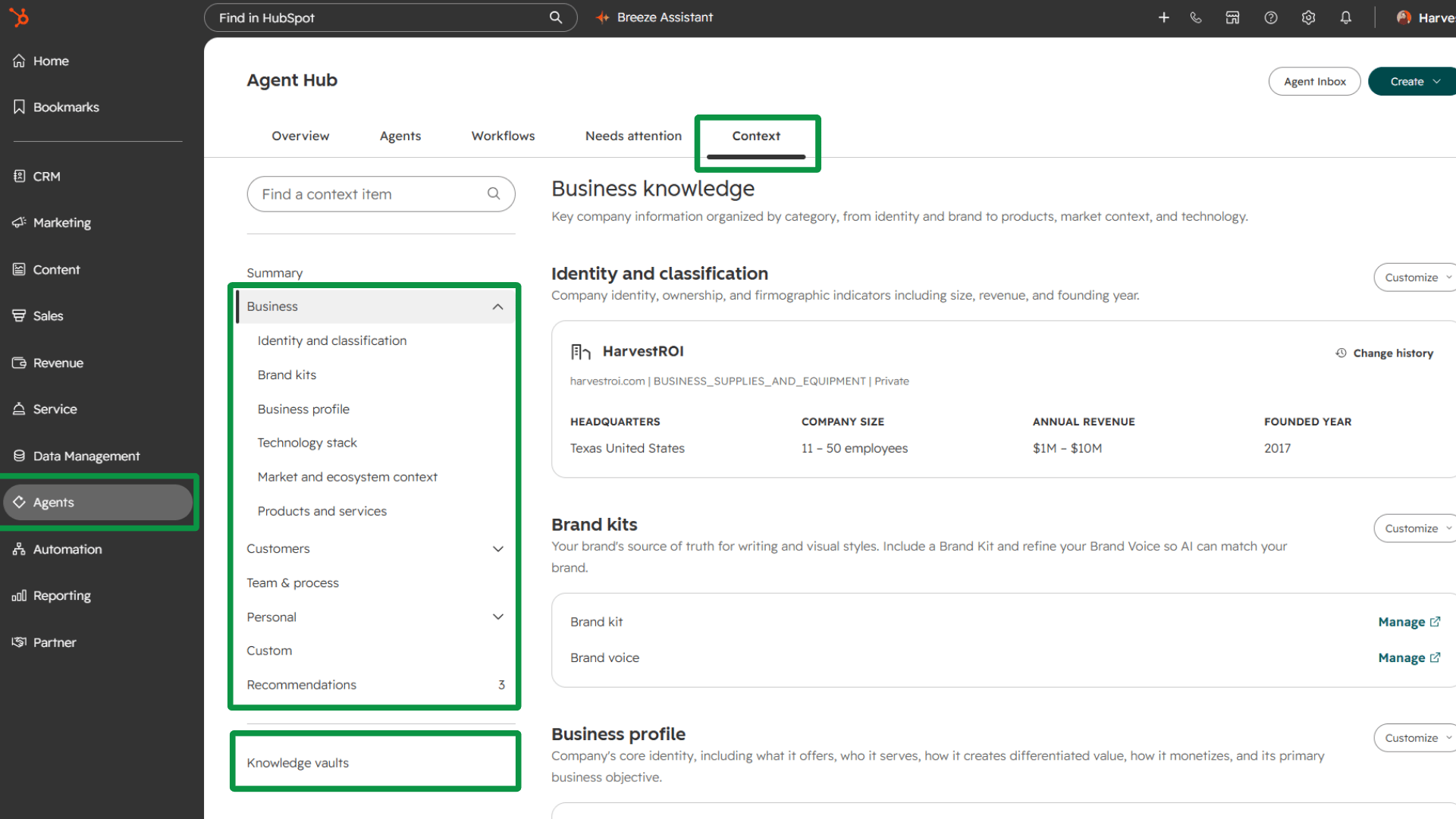
That understanding lives in Context Home, part of Agent Hub. It holds three layers. Business context covers your company size, revenue, what you sell, and who you serve. Team context covers how your teams work and who owns what. Customer context covers the relationships the CRM was built to track in the first place. Every agent and AI tool HubSpot announced reads from here.
Think of AI tools as employees. You would never hire someone, skip onboarding, skip training, and give them no information about their role. Without a context layer, that's exactly what you're doing: handing an entry-level hire a complex job and nothing to go on.
The most valuable context isn't sitting in your properties. It's in conversations. Human-to-human is where buyers give up the most information, and it's context you'll never find in email threads alone.
Should you add custom context beyond what HubSpot loads by default? Yes. When you open Context Home, HubSpot surfaces what it already knows about your business, and some of it will be stale. It might say, for example, you're based in Ohio when you moved to Texas a year ago. Correct it, then go deeper. The more detail you give it, the better every output downstream.
Before you turn it on: Audit what Context Home surfaced. Fix what's wrong before anything reads from it.
One Place to See Every Agent, Before You Have Forty of Them
Agent Hub launched earlier this year as HubSpot's answer to AI tool sprawl. It pulls every agent into one view, grouped by outcome, with one-click activation, performance monitoring, and suggested agents based on what HubSpot understands about your business and process.
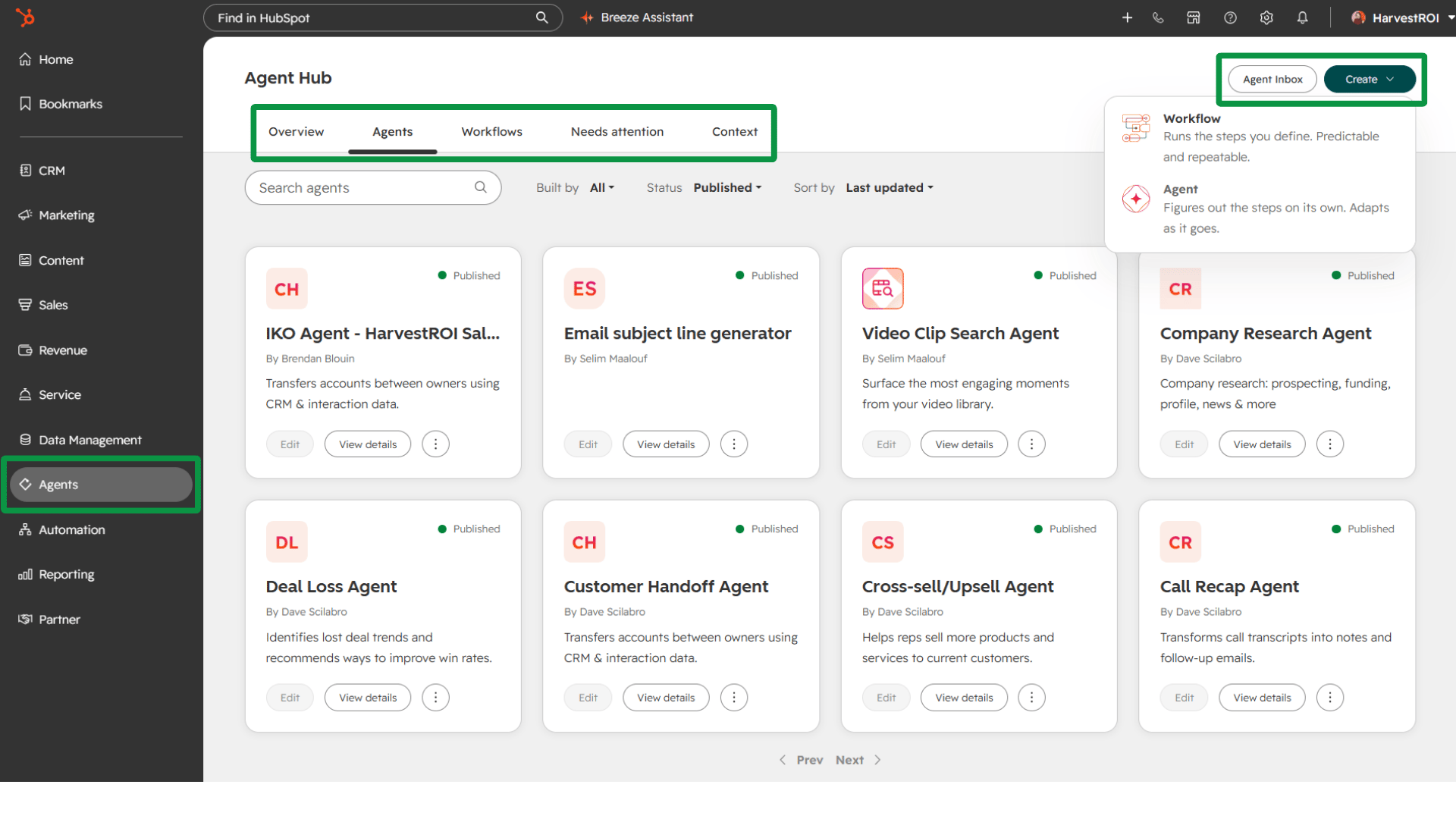
One-click activation sounds easy. That's the problem.
We see the same pattern in almost every audit we run. Teams inherit a portal and can't answer basic questions. Who built this workflow? Who set up these permission sets? Make agents easy to create, and the question becomes "who built this agent?" Agent Hub is the first place you can actually answer it.
Deploying agents for the sake of deploying agents is like turning on workflows for the sake of turning on workflows. It creates chaos, because nobody knows what the system is doing. Architect agents into the process. Document it first. Then find where the work feels heavy and let AI take the admin load off your people so they can spend more time on the human part.
The suggested agents are the underrated feature. Most teams struggle with where to start, and HubSpot recommending agents from your own context is a real on-ramp. Trust comes from use. Let people experiment in safe, visible ways, then keep asking the questions that matter. What's running? Who owns it? Is it doing what we intended? Do we still need it?
We covered this risk in depth in Before You Deploy HubSpot's AI Agents, Fix the Foundation.
Before you turn it on: Every agent needs a documented process, a named owner, and a defined outcome.
Breeze Assistant Graduated From Sidebar to Coworker
HubSpot rebuilt its architecture so AI is the foundation of the CRM, not a feature bolted on top. One visible result: the Breeze name is being retired from everything except Breeze Assistant. If your SOPs and training still reference Breeze-branded tools, they're already out of date. We can help you update them through AdoptionHub™.
If you tried Breeze Assistant before, forget what you saw. It behaves like a new product. Think of it as Claude or ChatGPT living inside your CRM, with direct access to your context and the ability to do real work there without a custom integration. It can build anything you can build, and it can call on agents to trigger workflows.
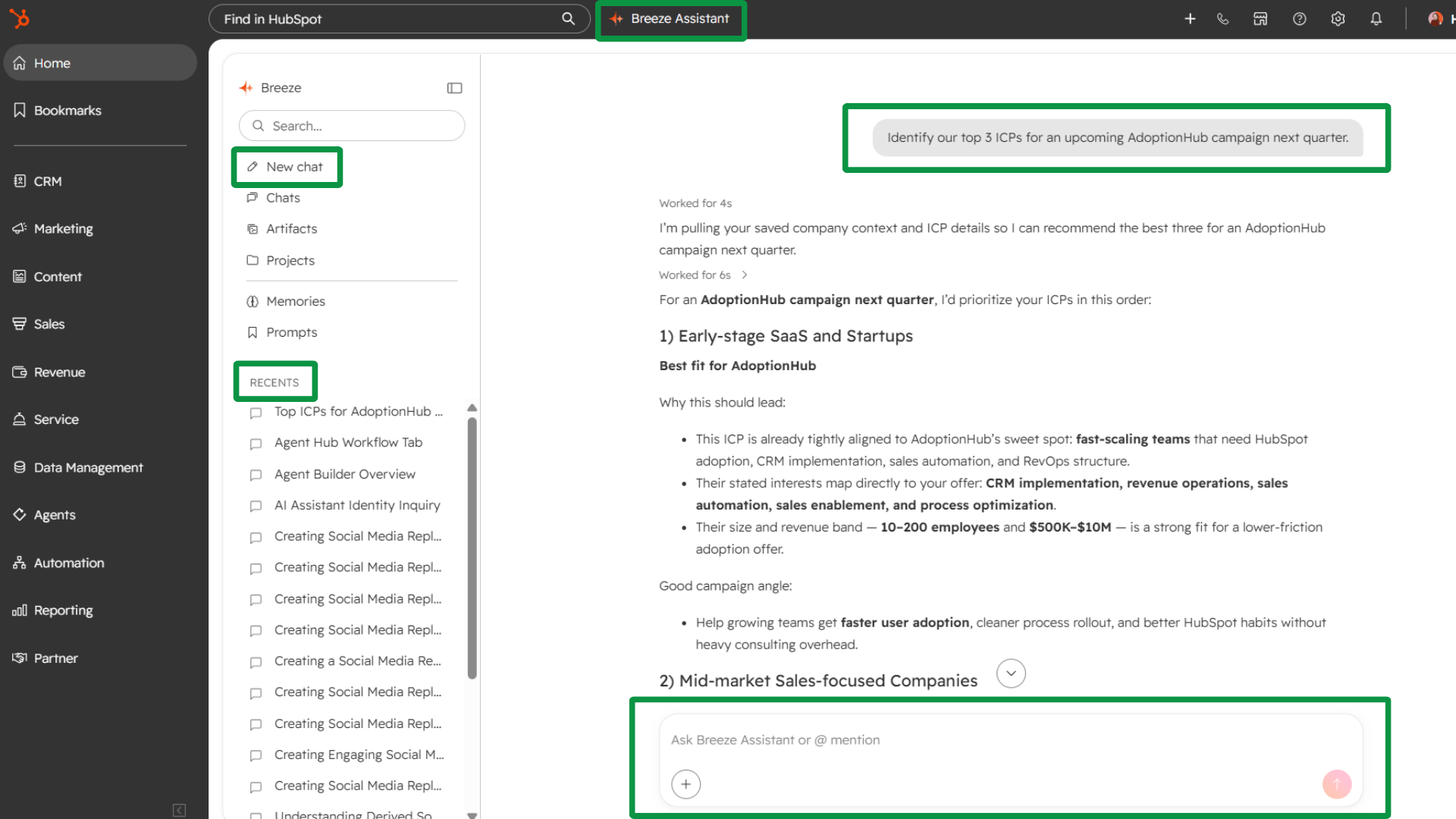
Your first use case should be small, repetitive, and low-risk. Meeting prep is a strong one. You're joining a sales call as support and weren't on the first one, so you ask Breeze Assistant to summarize the history. It's not a big use case, but you do it before every call, so the value adds up. Low risk also builds trust, because you can check the output against what you already know.
Here's a prompt anyone can try today. Ask it to summarize every email thread and conversation with a prospect over the last three months, then recommend next steps. General prompts get general answers, so refine until the output is right. Then save the prompt inside Breeze Assistant, and your team starts building a shared prompt library.
The catch: anyone can now build an agent just by describing it. When everyone can build, governance matters more, not less. Just because you can build an agent doesn't mean you should.
Before you turn it on: Pick one repetitive, low-risk task and get it right before you expand.
Agent Builder Is Here. Most Workflows Should Stay Workflows.
Agent Builder is the next generation of HubSpot's workflow builder. It builds both agents and traditional workflows, runs on your HubSpot data, and accepts triggers from outside the CRM, including third-party integrations. Once it reaches feature parity, the old workflow builder sunsets. HubSpot has already shipped tools to migrate existing workflows, or convert them into agentic workflows with an agent step inside.
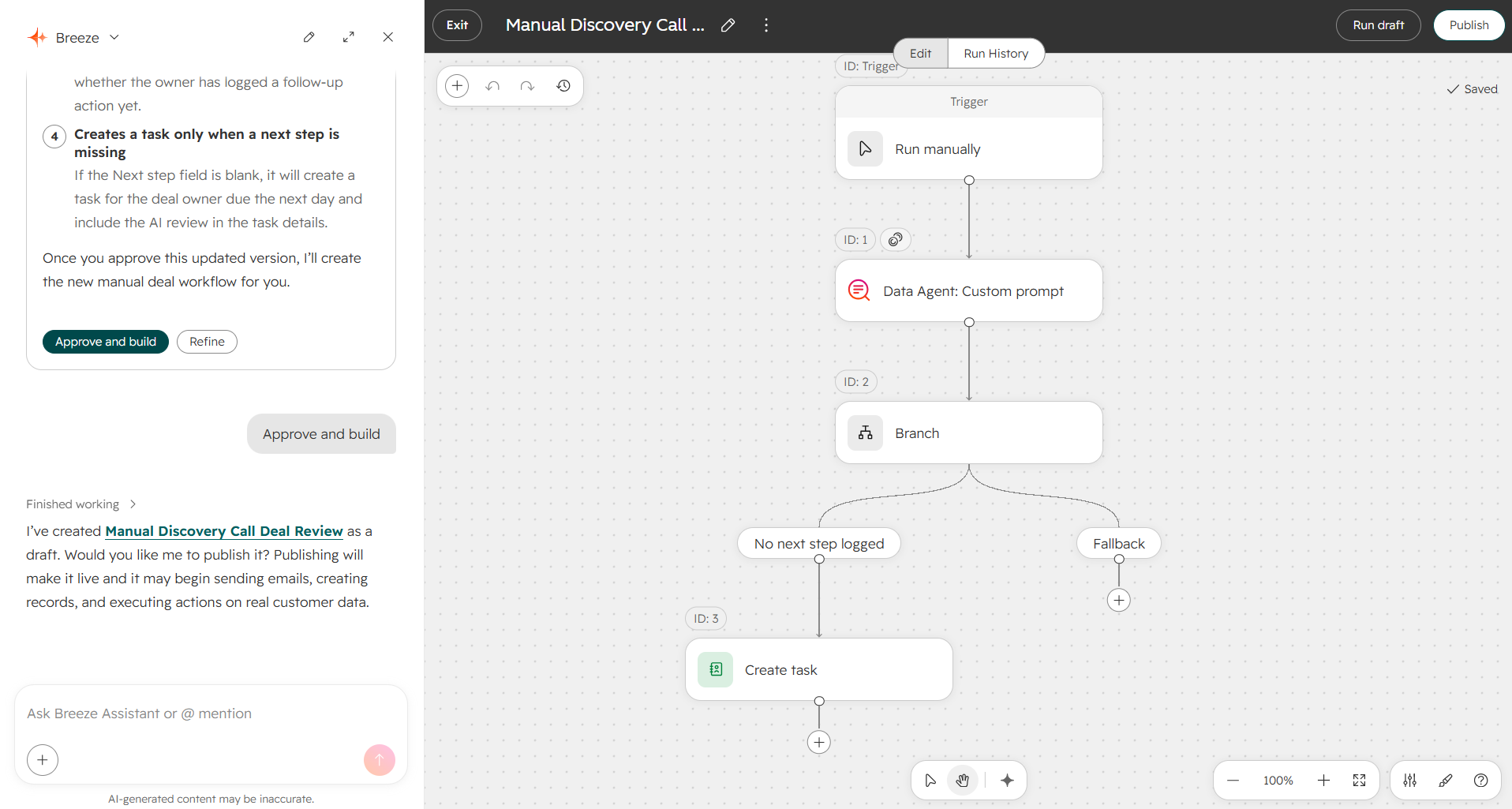
Agents run on your actual contacts, deals, and conversations. If your data isn't clean, that's garbage in, garbage speed out. And a visibly sloppy AI rollout burns trust fast, with your team and with your customers.
You won't clean your whole CRM in a quarter. Nobody does. Work backwards from one use case instead. Define the outcome for one agent, identify the data it needs to perform accurately, and fix that data. Then move to the next piece. Leads this quarter. Sales next.
Here's the rule we heard from HubSpot's own product managers on the show floor, and one we've been repeating internally: not everything should be an agent. Even Agent Hub's suggestion tool recommends traditional workflows alongside agents.
Predictable rule? Use a workflow. Interpretation? Use an agent.
When a deal closes, create a task. That's a rule. A workflow does it faster, and it doesn't spend credits. Agents earn their place when a step needs context, interpretation, or a judgment call about what happens next.
A simple marketing example is the open-text "How did you hear about us?" field. Normalizing free text into a dropdown used to take a tangle of workflow branches. With an agent step, it's three moves: take in the form submission, invoke the agent to interpret the answer, and set the property.
Before you turn it on: Decide whether the task is deterministic or interpretive. Only interpretive work gets an agent.
HubSpot Work Fixes Handoffs. It Doesn't Have to Replace Your PM Tool.
HubSpot Work is HubSpot's new project management tool, built on the same agent infrastructure with full access to your CRM context. If you've used Asana or ClickUp, it will feel familiar. It doesn't look like a traditional HubSpot screen.
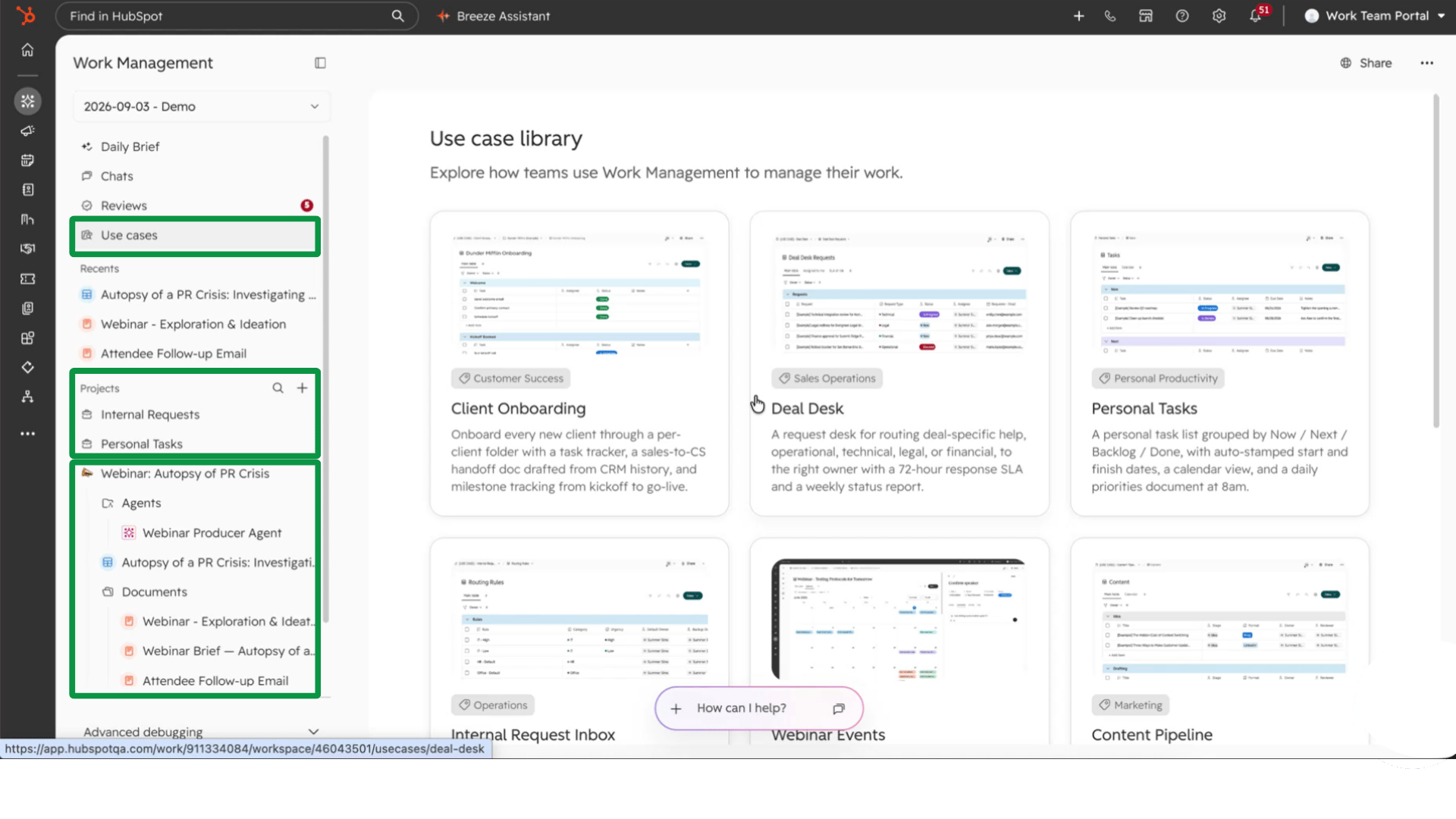
We run our own delivery team in ClickUp, so our take is practical. Don't start by asking which tool you can replace. Start with the handoffs. Where does customer information leave HubSpot, get managed somewhere else, and then have to find its way back?
Onboarding is the obvious one. The deal closes, and the sales history, proposal, and notes all live in HubSpot. Then someone recreates all of it in another tool. That's the handoff worth examining. Marketing teams are already using HubSpot Work to run campaigns, too.
It includes time tracking, and it comes with core, sales, service, and revenue seats. No additional hub to buy. It's in beta now, and you can activate it from your product updates. If you don't have a project management tool today, this is an easy place to start.
When our team demoed HubSpot Work on the floor, our first question was where the time tracking was. It's there. The bigger point: HubSpot's product team wants this kind of feedback and acts on it. What you report during the beta shapes what ships.
Before you turn it on: Map every place customer context leaves the CRM today. Those are your use cases.
Prefer to watch? Our team walks through every announcement in this post on video.
Marketing Gets a Command Center and Three Agents
Marketing Studio 2.0: every campaign in one view
HubSpot launched Marketing Studio in beta last year, and we've used it ever since. Version 2.0 folds in feedback from early users, and it's now good enough to recommend to anyone who hasn't jumped in.
It's a command center for every campaign running through HubSpot. You get performance insight, flags for what needs attention now (overdue tasks, results that could be improved), and a canvas that shows every asset in a campaign and which stage each one supports. The canvas is multiplayer. Teammates work in it together, leave comments, and assign tasks with owners and due dates directly from the view.
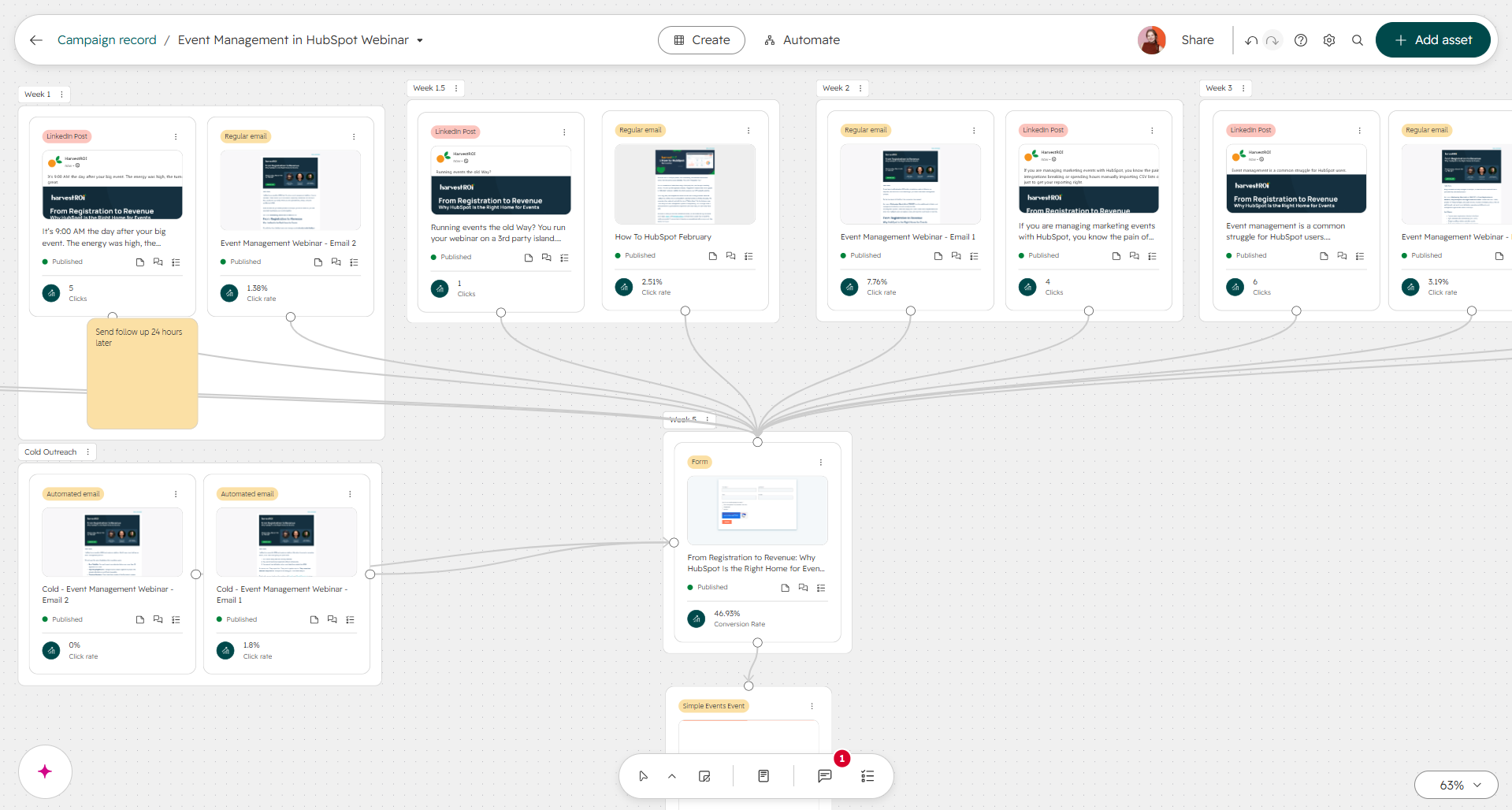
Campaign Agent: from brief to built assets
HubSpot pioneered inbound marketing and recently published Loop, its AI marketing framework. Campaign Agent packages that expertise along with what HubSpot has learned across its customer base.
Talk to Breeze Assistant about an upcoming campaign, or hand it the recording of your planning meeting. Campaign Agent checks your brief against Context Home for ICP alignment and messaging direction, then proposes a campaign plan with a full asset list. You review it, change what needs changing, then tell it to build the assets. Credits are spent only when you confirm.
Nurture Agent: context, not tokens
Traditional nurture runs on tight segmentation and personalization tokens. Nurture Agent adjusts each send based on what HubSpot knows about that individual contact. It closes the gap between a hyper-specific one-to-one sales sequence and the generic marketing email most teams still send.
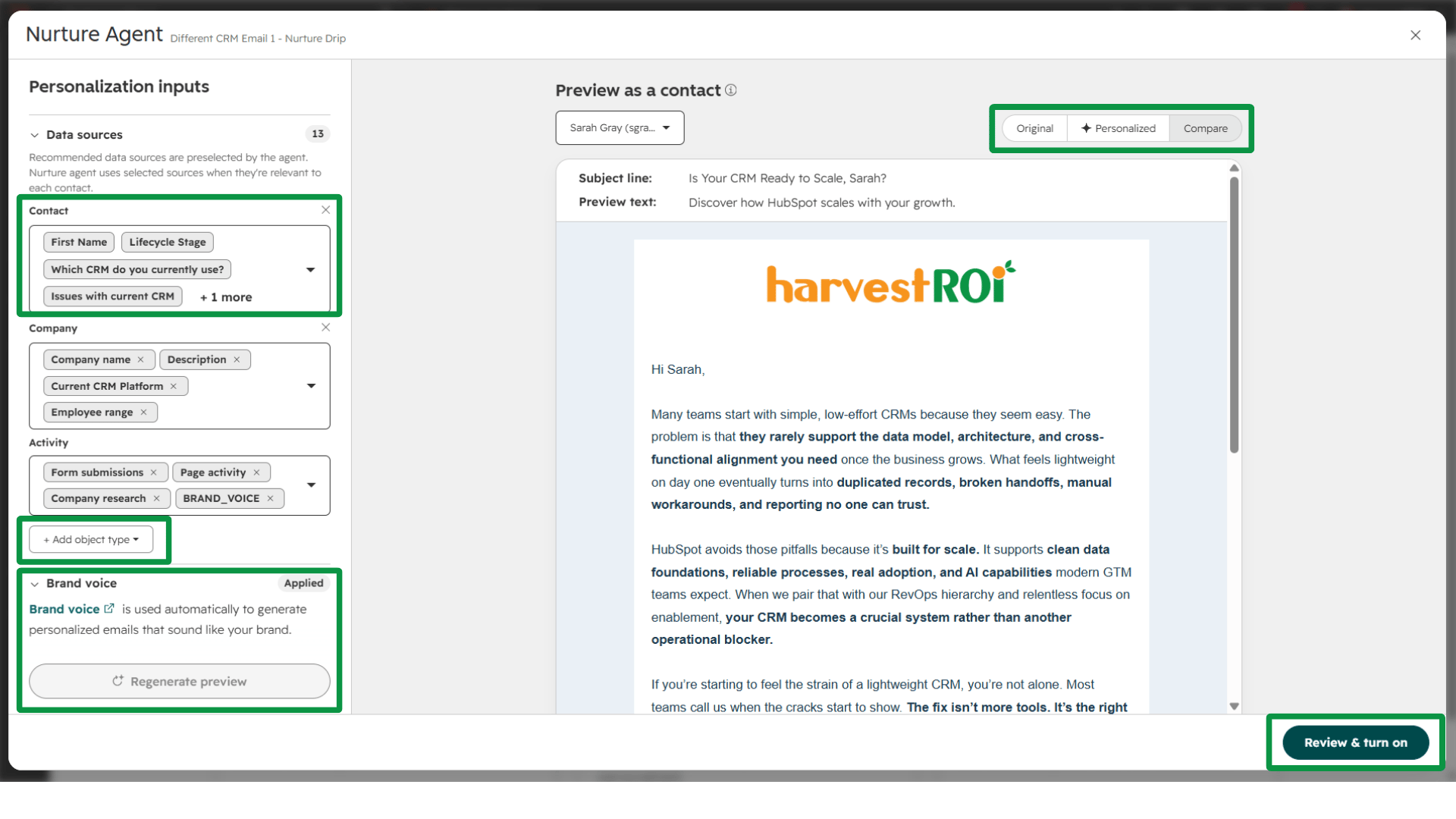
The biggest payoff is in dispositioning, one of the most common misses we find in portals. Sellers hold onto leads and deals they should disposition. When lost and disqualified records land in clear categories like budget or timing, they can flow into segments and get nurtured with context about why they fell out and what the company actually needs. That's how you win back deals you'd written off, and it's a far better return on your marketing spend.
Rollout works like A/B testing. You choose what percentage of a campaign's sends Nurture Agent touches, and you see a credit estimate before you approve.
Content Agent: from AEO insight to draft
More buyers start their research inside an LLM, and even Google now leads with AI-generated answers. HubSpot's AEO tool, launched last year, suggested what content you should write. Content Agent takes the next step, using your AEO analytics, portal context, and customer context to generate the draft. We wrote about where this started in From Writer to Editor.
Watch the credit timing. Unlike Campaign Agent, Content Agent spends credits when the draft generates, not after a review step.
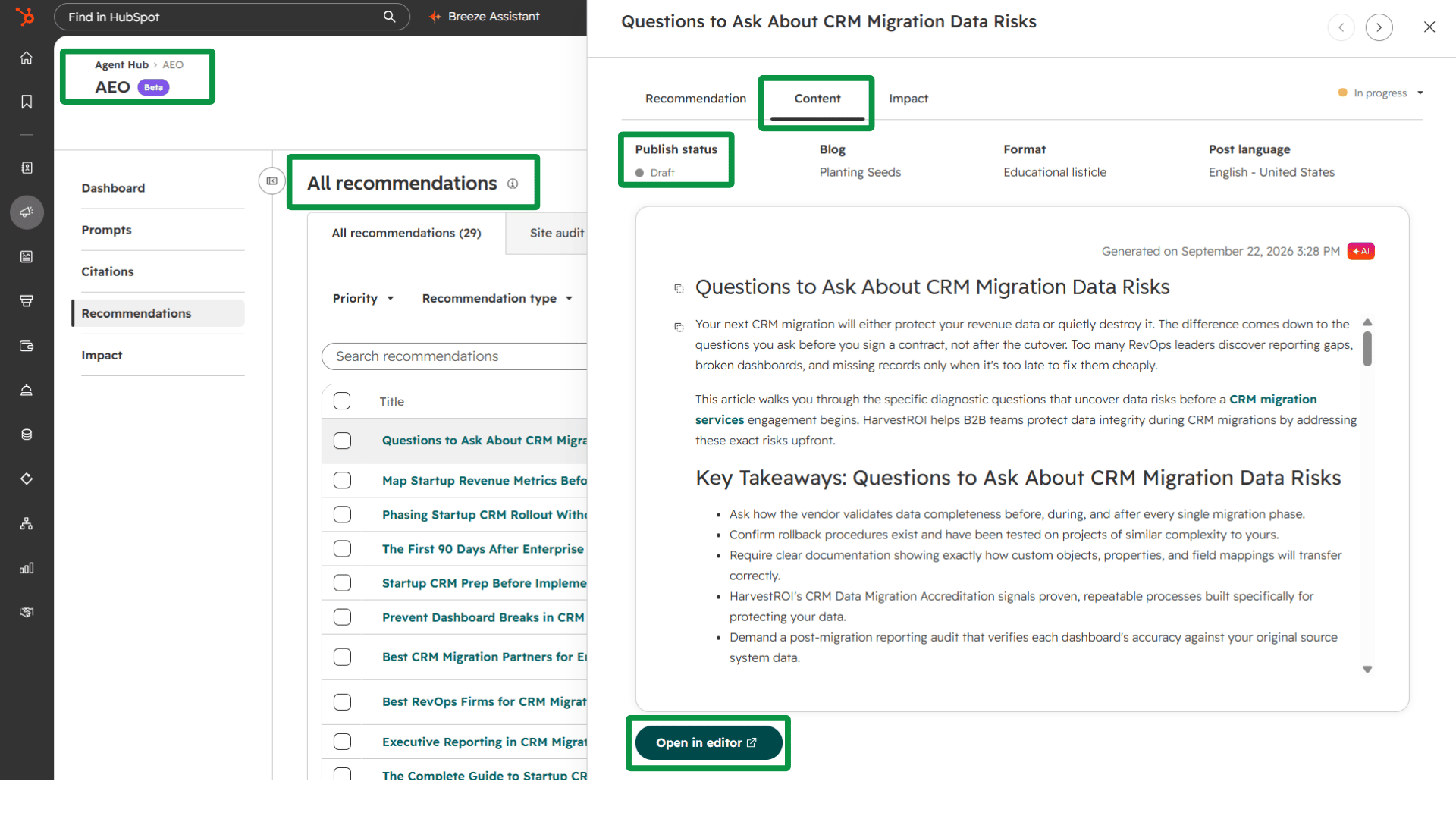
For lean marketing teams, Content Agent is the difference between a backlog of guides we keep meaning to write (FAQs, new features, questions that come up in client conversations) and actually publishing them.
Before you turn it on: Your ICP and messaging live in Context Home, and your lead and deal disposition reasons are defined.
Deal Progression Ends the "I'm Feeling Good About This One" Pipeline Review
Deal Progression existed before UNBOUND but never got main-stage time, so few teams have tried it. It's much stronger now.
HubSpot reads the context of your sales conversations, including meeting transcripts, emails, notes, and anything else connected to the CRM, and detects the updates your records need. The CRM keeps itself current. Updates to HubSpot's native properties don't cost credits, so anyone with a sales seat should be testing it.
Reps have been promised "no more data entry" for years. This time is different. Pair Deal Progression with HubSpot's note taker, which works on Zoom, Teams, and even phone calls for sales and service seats, and reps can stay in the conversation instead of typing through it. From the transcript, Deal Progression recommends the deal stage, drafts the next email, and updates the deal plan. If the timeline slips because a decision maker is on vacation, or the conversation turns to expansion, the plan adjusts.
That changes pipeline reviews. Instead of a rep's gut feeling, managers get facts. You can even share the deal plan with the buyer, so both sides work from the same next steps and dates. Nothing has to send automatically. Reps review, edit, and send. But when the writing is teed up, each rep can carry more deals. Higher conversion, shorter cycles, more capacity per rep. If you're hunting for ROI in this year's announcements, this is where it is.
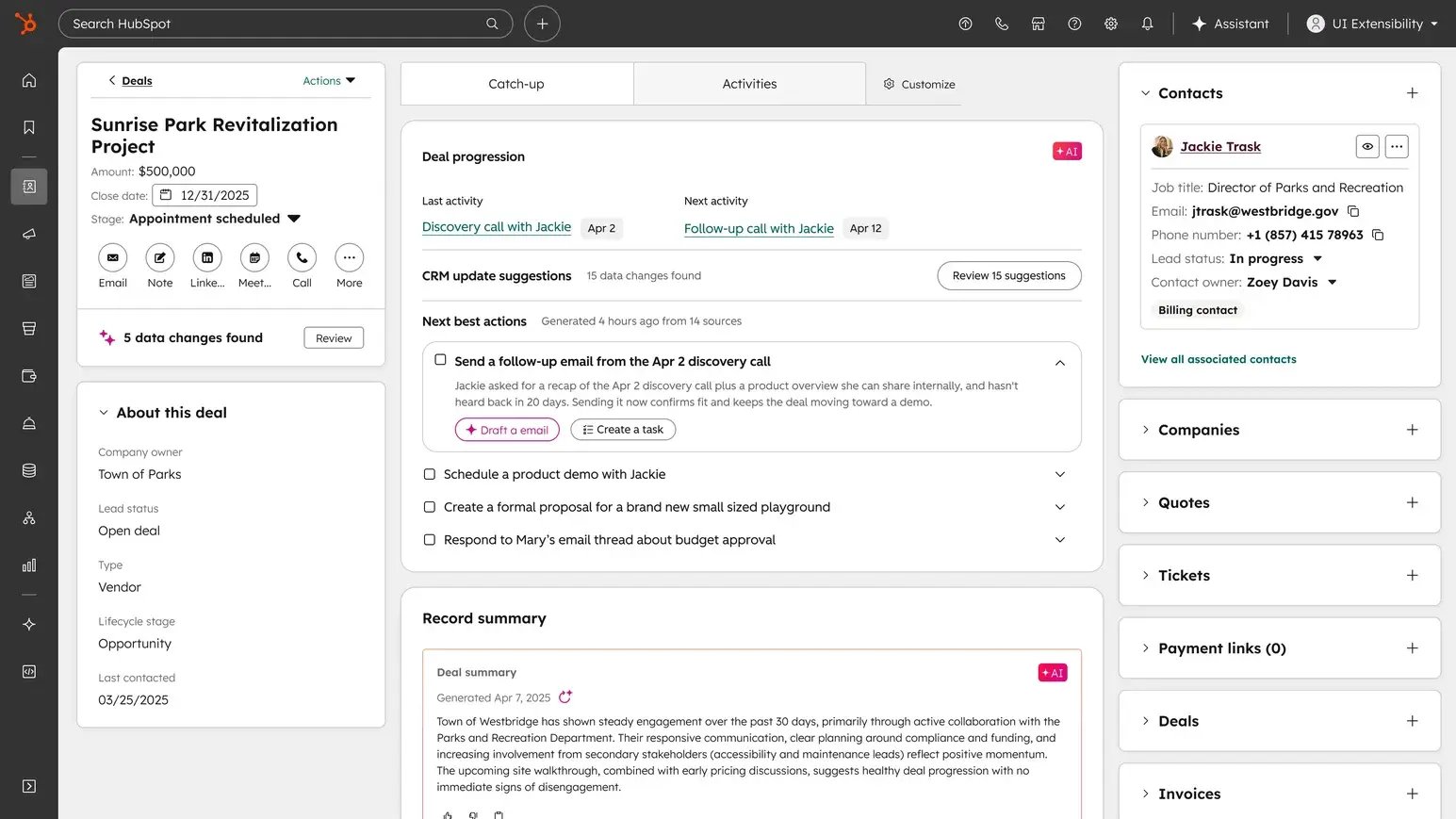
The catch-up tab that summarized buyer sentiment and next steps on company records now lives on deal records and the deal index, too. From a table view, you can ask what needs follow-up today.
It's self-updating, not self-governing. It suggests. You supply the methodology. HubSpot ships with classic sales methodologies built in, and you can load your own. Ours is a hybrid of Challenger and MEDDIC, layered with our RevOps Hierarchy of Needs™.
Before you turn it on: Sales leaders need four things in place first.
- A clearly defined sales process for each pipeline
- Deal stages with real exit criteria
- Consistent contact and company associations, including association labels
- Written definitions of a healthy deal, a stalled deal, and an at-risk deal
Get those right, and you can finally retire the open deal with a close date from last quarter.
Revenue Hub Is the Glue Between Sales and Finance
Revenue Hub launched before UNBOUND, so it didn't get the stage time the agent announcements did. It may be the one we're discussing most with clients right now. It's HubSpot's quote-to-cash home, and it handles natively what clients used to ask us to hack together with workarounds.
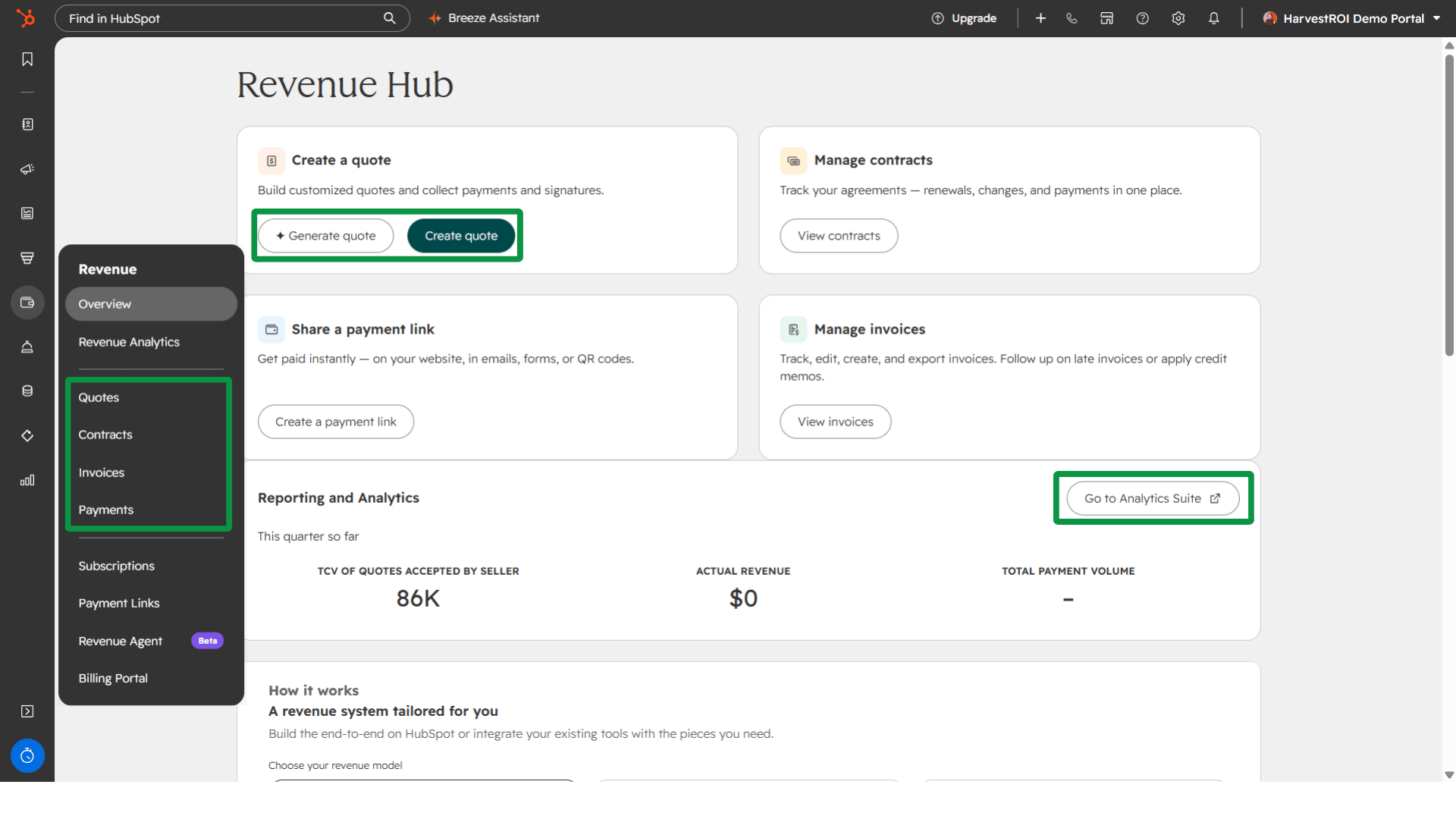
On the CPQ side, you get tiered pricing, price books that apply special discounts for specific customers or ICP groups, and advanced approval processes. On top of that sits the contract object, which finally makes MRR and ARR tracking workable in HubSpot. An upgrade creates a new contract that shows the revenue change. Changes can be co-termed and prorated, which makes renewals far simpler. Usage-based revenue reconciled weekly or monthly shows up in HubSpot, along with your invoices.
HarvestROI recently earned HubSpot's quote-to-cash capability badge. For the full breakdown, read everything you should know about Revenue Hub.
Revenue Agent: collections without the chasing
The UNBOUND addition is Revenue Agent. It monitors open invoices and sends reminders before and after due dates. You can run it fully automated or semi-autonomous with approvals, and you shape the voice of every message.
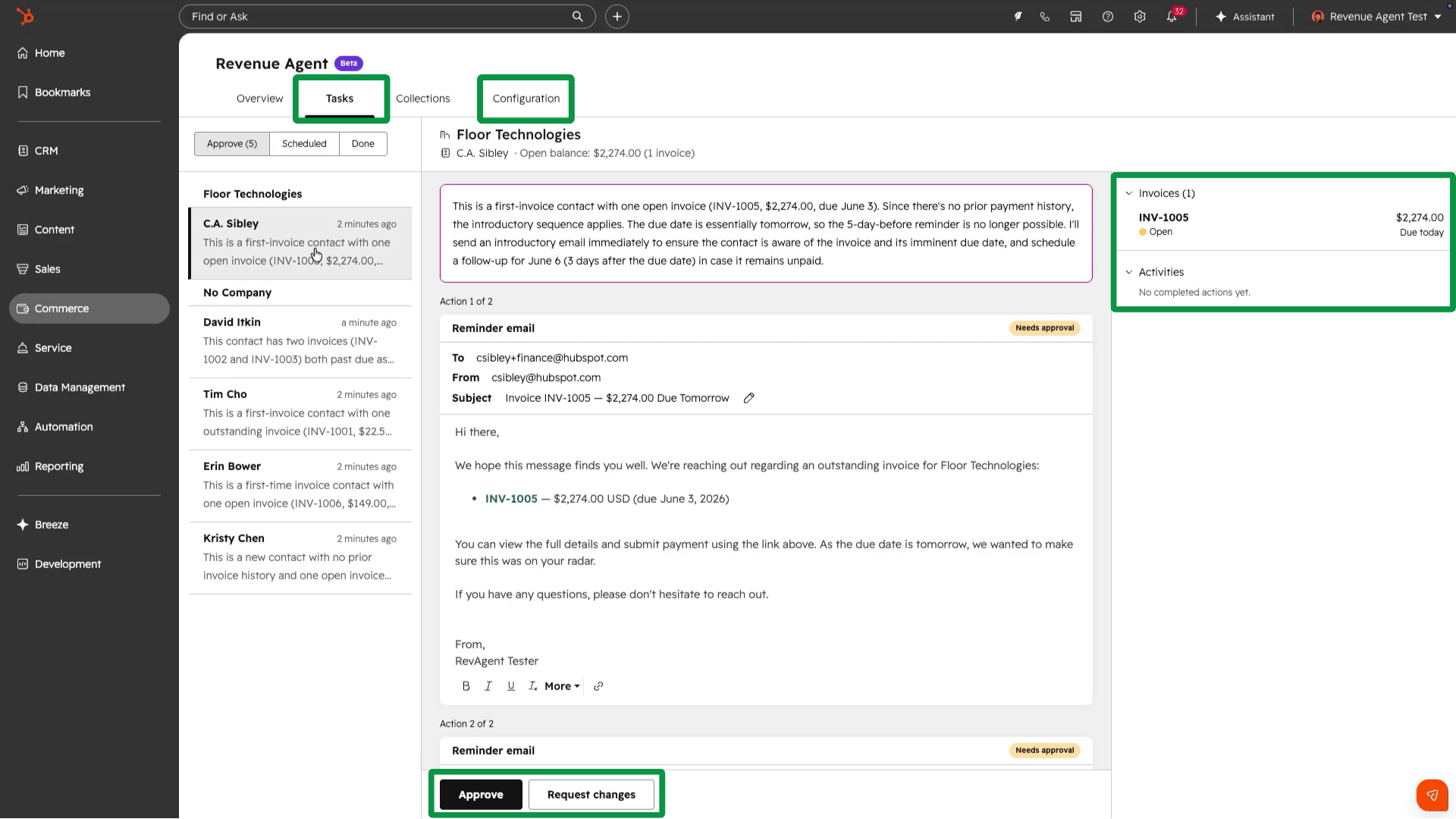
Keep humans on the exceptions. Payment disputes, large accounts, and sensitive relationships still need a person. But if an agent handles the routine 80 percent, your finance team spends its time on the 20 percent that actually needs judgment.
It doesn't require HubSpot Payments. If invoices from another system, QuickBooks for example, sync to HubSpot's invoice object with payment status and dates, Revenue Agent can work them. The best fit is any business with meaningful invoice volume paid by ACH or check rather than autobill.
An unpaid invoice is lost revenue. Invoicing is one thing. Getting paid is what matters.
Before you turn it on: Invoices sync to HubSpot with accurate status and due dates.
What to Do in the Next 30 Days
First, this isn't going away. Whatever your opinion of AI, compare what these tools could do a year ago with what they do now. It's night and day.
Getting ready means auditing for AI readiness through the Hierarchy. Start with your data architecture and data health. Then look at whether your team actually adopts your processes, how your data is governed, and how enablement works. On top of that sits the layer that matters most for AI: are you capturing the conversations with prospects and customers that give every lead and deal its context?
Second, don't leave this post and enroll in every beta. Pick one place where your team feels real friction. Define what you're trying to improve. Then ask three questions. Do we have the data? Do we have the context? Is the process defined? That's your first project.
Bad context is worse than no AI. But no context and no AI is just falling behind more slowly.
Start small. But get started.