Small, minimal-effort CRMs, like Pipedrive and Monday, attract a lot of teams for one reason: they feel easy. The interface is clean, setup seems straightforward, and there is little friction in getting your first users logged in. For early stage companies, that simplicity can feel like exactly what they need.
However, simplicity at the beginning often turns into constraint later. As your business grows, your data becomes more complex, your processes expand, and your team relies on the CRM for more than contact management. That is when lightweight tools begin to show their limits. What once felt effortless becomes a daily operational tax.
This is where the contrast with HubSpot becomes clear. HubSpot is designed to scale with your company.
To understand why this difference matters, let’s look at the most common challenges companies encounter with small, low-effort CRMs.
1. Offering Simplicity Instead of a Real Data Foundation
Lightweight CRMs typically provide basic objects, light customization, and minimal governance. This is refreshing for smaller teams. However, without a strong data model beneath the system, the CRM quickly fills with duplicate records, inconsistent fields, and disconnected information.
Reporting becomes unreliable because the structure behind the data was never built to scale. Standard objects are great, but one size never fits all.
For example, imagine you own a pet grooming business. You will have no problem adding your clients' names to CRM, however, adding non-standard objects such as "Pets" is often not possible.
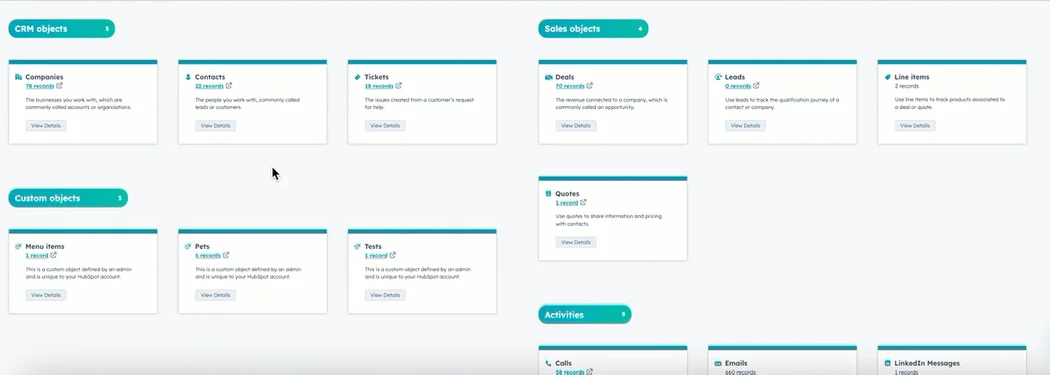
HubSpot, on the other hand, provides a flexible object structure, deep customization, and clean data governance. Working perfectly for businesses who want to scale. It supports the architecture needed for segmentation, lifecycle tracking, reporting, and cross-functional alignment.
Instead of outgrowing your CRM, your CRM grows with you. The Custom Data Model builder allows you to add a custom object for "Pets" inside of your CRM data model. As your business grows, any needs for new data collection are easily added to your CRM.
2. Limited Process Support Leads to Broken Handoffs
Most small CRMs, like Pipedrive are built for one function, sales. Which is a good option for teams solely focused on closing deals. However, that limited focus becomes a real issue when marketing, sales, and service teams all need visibility into the customer journey.
Handoffs get sloppy because the CRM cannot support the processes that connect teams. Internal friction increases and customers feel the inconsistency.
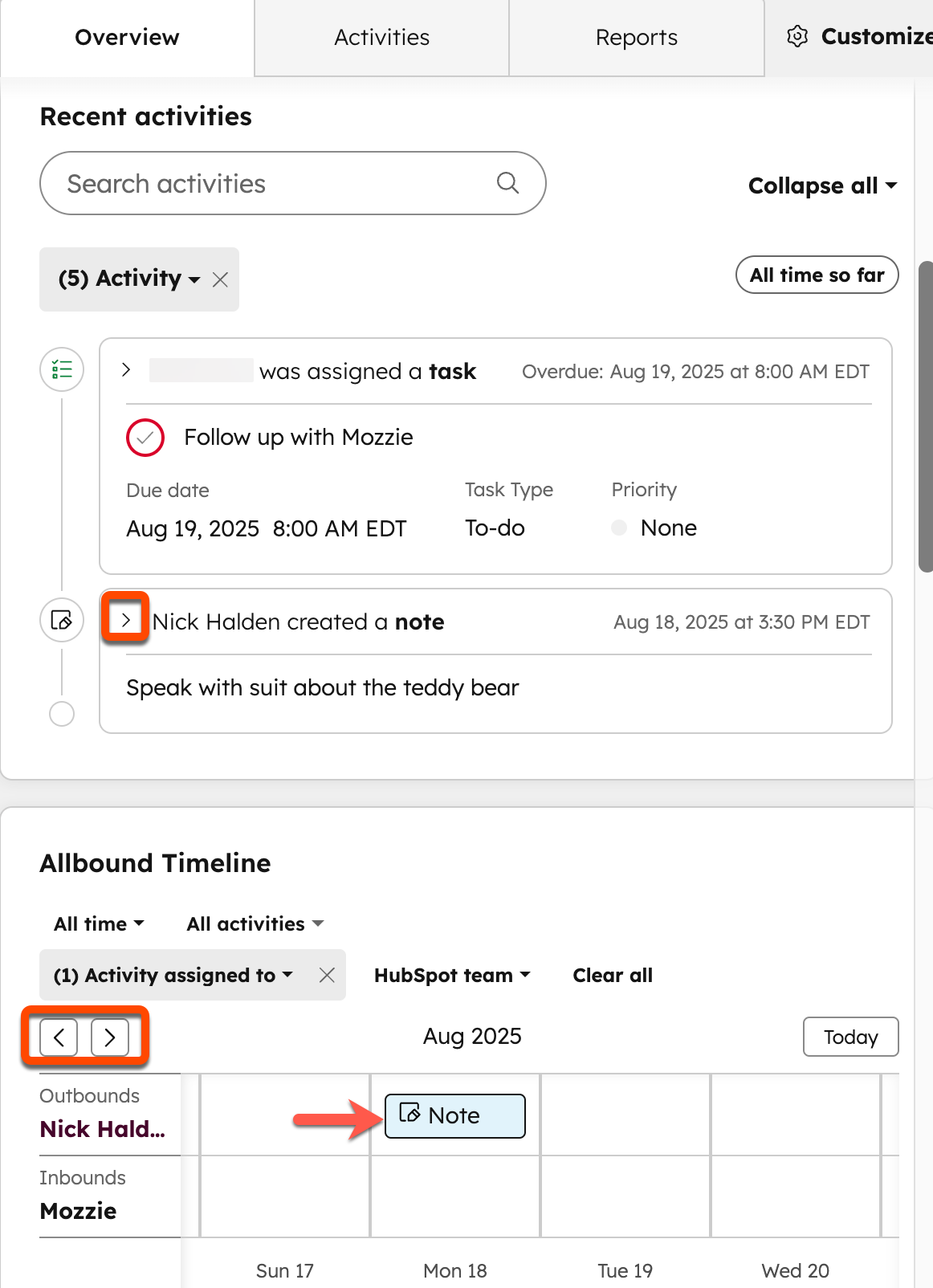
HubSpot centralizes the entire go-to-market engine under one system. Marketing, sales, service, and operations all work from a single source of truth.
With workflows, pipelines, record customization, and shared communication tools; handoffs become smoother and alignment comes naturally.
3. Reporting Breaks the Moment Complexity Appears
Lightweight CRMs, can show you simple reports. Which is great for companies with no needs to dive into custom reporting. However, they rarely support the depth revenue teams need once pipeline reviews, forecasting, attribution, or cohort analysis come into play. Leaders will begin to notice discrepancies and teams will start managing data offline.
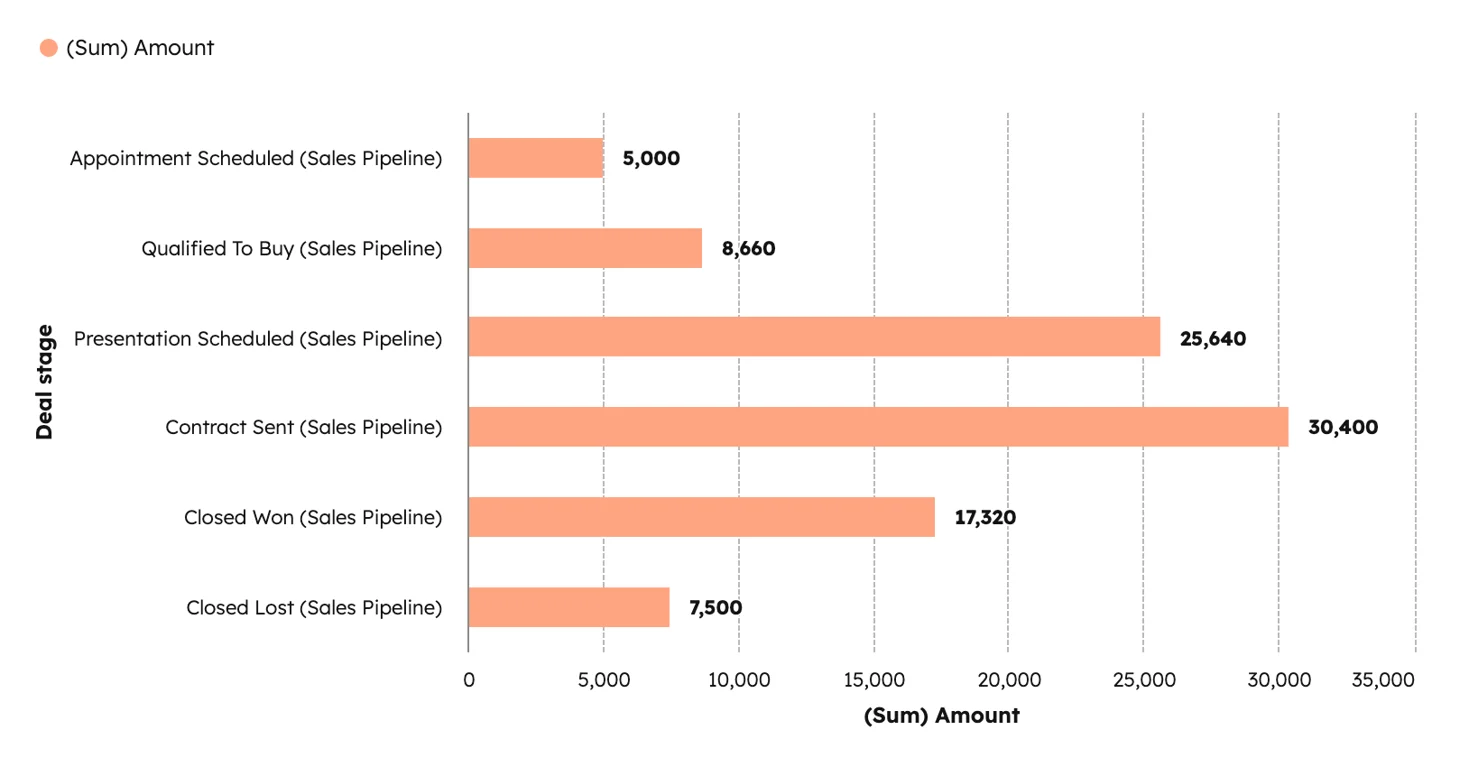
HubSpot offers custom reports, datasets, dashboards, and attribution modeling. These different reporting options allow teams to support strategic decision-making.
However, building custom reports in HubSpot, requires education and practice with the tool. To solve this challenge, you can now use AI and standard reports to pull key data in HubSpot. This makes reporting both accessible and powerful.
To enhance HubSpot's reporting some enterprise teams integrate BI (Business Intelligence) tools for more informed decision making.
4. Adoption Drops Because the Tool Stops Supporting Real Work
Small CRMs often feel intuitive on day one, but as soon as the system requires more than basic data entry, the cracks appear. Sellers resort to spreadsheets. Marketing cannot rely on segments. Service teams lose context. The CRM stops being useful, and usage plummets.
On the other hand HubSpot gives each role the tools they need.
With HubSpot:
| Marketers Get: |
Sales Gets: |
Services Teams Get: |
| Automation |
Sequences |
Tickets |
| Personalization |
Workspaces |
SLAs |
| Attribution |
Templates |
Customer Support Workspaces |
Adoption rises because the system helps them do their jobs instead of slowing them down.
5. Siloed Systems Due to Lacking Integration Capabilities
Most organizations are planning to use more than one tool alongside their CRM. To avoid siloed systems and have a centralized data source, businesses need to integrate their software. Small CRM's have a set number of pre-built integrations and limited APIs. These can work well if they actually offer standard integrations with the tools your business uses. However, if these connectors are inexistent you will need extensive technical resources and additional tools to build a custom integration.
HubSpot, on the other hand, provides a wide-range of standard integrations. These integrations make connecting the tools your business already uses with HubSpot simple. With a few clicks HubSpot will integrate with your current and future tech stack. Although HubSpot's App Marketplace is vast (and always growing), you may still discover a needed integration that doesn't exist. HubSpot provides APIs and documentation to make developing a custom integration as simple as possible for your development team.
6. Create Operational Debt You Only See Later
While lightweight CRMs can get you started right away, they mask their limitations until your business becomes too complex. At that point, teams find themselves rebuilding processes, recreating fields, rethinking reporting, and scraping together integrations. The cost shows up in time and also in lost visibility and poor decision-making.
HubSpot has excellent free tools, however, many useful features are only available at paid tiers. These tiers allow you to invest more in your CRM after proving ROI with the system. HubSpot makes scale predictable. Instead of rebuilding your CRM every time your business evolves, you adjust the structure you already have. You expand instead of starting over.
Simplicity Should Not Come at the Cost of Growth
Small CRMs are rarely the wrong choice at the beginning. In fact, they can be a good option for smaller teams, focused on sales, with no plans to scale. However, they are the wrong choice when your business matures. Growth creates complexity, and your systems must be designed to handle that complexity without creating chaos.
HubSpot offers the balance that most teams are looking for. It is simple enough for early adoption and powerful enough to support enterprise-level processes. It creates clarity instead of operational debt and provides a foundation that grows with your business instead of fighting against it.
If you’re starting to feel the limitations of a lightweight CRM, the good news is that you’re not stuck. You only need the right system and the right architecture to support where you’re going, not just where you started.
Take the first step in designing your CRM for successful scale, contact us today!